
Businesses rely on systems to accomplish certain objectives in their day-to-day operations. Systems allow employees to find information, process it, share it, and transform it for specific ends. Systems can range from expensive proprietary software to in-house workflows that rely on a variety of different pieces of hardware and software. Even if you are not paying for a proprietary piece of software that provides a specific system function, you almost certainly have a combination of different people, processes, and technology that work together to provide the equivalent function. In previous documents, you have taken inventory of all the hardware, software, identities, data flows, and networks that power your business environment. This documentation will help you understand the end systems that are powered by each of these components.
Customer Relationship Management (CRM)
A Customer Relationship Management (CRM) System helps you keep a holistic view of your relationship with your customers. How your customers feel about their experience with your business is probably the most important insight you can obtain. CRM systems break these insights down into actionable data that can be used to improve customer relationships and increase profitability.
A CRM system typically involves things like sales and marketing communications, customer surveys, e-commerce insights, and purchasing trends. Proprietary CRM systems like Salesforce usually provide a dashboard that serves as a single source of truth for everything related to customer interactions. Insights are broken down into figures, visualizations, and reports that can be used to influence business trends.
Even if you don’t have professional CRM software integrated into your business, you certainly have a collection of data flows and processes that work together to influence your relationship with your customers. For example, you may have a contact form on your company website for customers to drop suggestions/raise concerns. You may also periodically send out a Google Form to measure customer opinions on a new product/service. The contact form and Google Forms are sent to your mailbox for you to review. You may use AI tools to help analyze the customer data and pull insights from it. In this scenario, the company website forms, Google Forms, email connectivity, and AI software all combine to make up your CRM system.

Enterprise Resource Planning (ERP)
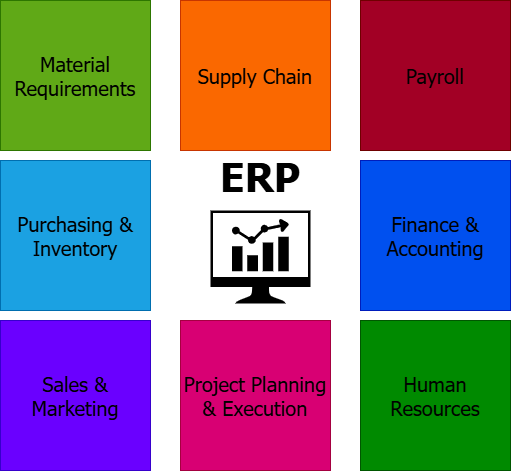
An Enterprise Resource Planning (ERP) System is a powerful platform that glues every individual system and department in your business together. This allows you to have a holistic overview of the critical operations, plans, schedules, capital, and tools that power your business on an everyday basis. A typical business day involves different departments performing their specific tasks, passing on information when needed, but largely focusing on their own workflows. An ERP system combines data from each department automatically and produces trends, visualizations, and reports for management to view. This reduces the need for management to sift through large amounts of redundant data, trying to gain insight into how healthy business operations are. Instead, they can streamline this process through the ERP system.
The processes that an ERP system can keep track of include Finance & Accounting, Purchasing & Inventory, Payroll, Supply Chain, Human Resources, Sales & Marketing, and Project Planning & Execution. A small business owner may normally keep track of these processes through a combination of paper documents and messages that they have to organize and study closely. Implementing an ERP system reduces the time needed to do this, and instead provides insights on a centralized dashboard. This boost to productivity is the main reason why it's worth looking into purchasing a proprietary ERP system in today's era of business. Popular ERP systems on the market include Microsoft Dynamics 365, Oracle ERP Cloud, and Net Suite.
Supply Chain Management (SCM)
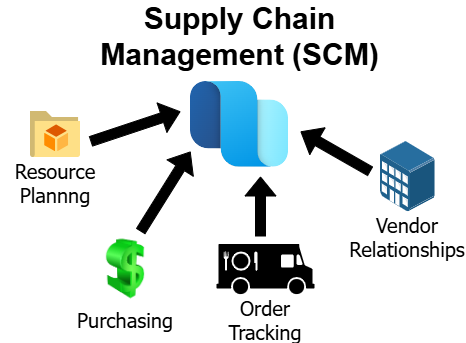
Supply chains can be complex and difficult to keep track of, even for the largest enterprises. Many small businesses rely on the smooth transfer of goods and other resources to function properly. For example, a small town mom and pop gas station is basically dependent on smooth supply chain functionality to stay in business. In recent years, supply chain management has gotten increasingly complex due to economic and political factors. In addition, digital technology has influenced how supply chains work. The introduction of centralized Supply Chain Management (SCM) systems is one such piece of technology that helps simplify and streamline the burden of keeping track of supply chains.
With an SCM system, business owners can effectively manage resource planning, purchasing, order tracking, and vendor relationships. Small businesses that lack a centralized SCM platform must jump between various vendor websites to view product details, sift through emails to track product shipping, and manage folders full of receipts and invoices. A proprietary SCM system will centralize and analyze this data for you, increasing productivity by allowing you to focus on other business tasks. Some good SCM options for small businesses include Precoro, NetSuite, and Easy4Pro.
Content Management System (CMS)
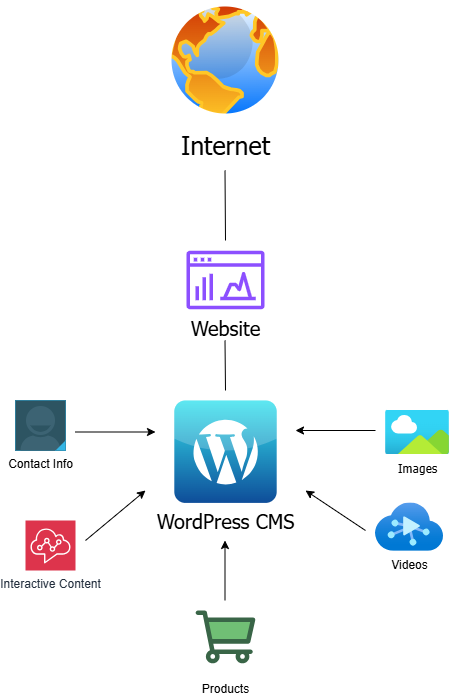
Digital transformation of the economy has made it essential for every business of every size to have an online presence. Even small businesses confined to local communities will benefit from a company website and Facebook page to showcase their goods and services and point customers in their direction. Other businesses rely completely on the Internet. For example, a group of friends may go into business selling merchandise, using an e-commerce website for sales and a TikTok page for advertising. In all of these cases, Content Management Systems (CMS) are used to communicate with the public. At its core, a CMS is simply a platform that is used to manage the digital content that a business produces.
Website builders such as WordPress, Wix, and Squarespace are popular examples of CMS. Rather than developing a website from scratch using HTML, CSS, and JavaScript, businesses can construct their websites using drag and drop features on the CMS. The platforms also keep track of the images, documents, videos, and other content that businesses decide to publish online. Other CMSs, like Shopify, are specifically towards e-commerce operations. Using a CMS is a lifesaver for small businesses, both in terms of productivity and finances. There is no need to take on the burden of producing and managing a website from scratch, and many security responsibilities are transferred to the CMS platform.
All of the above processes are critical for success, so even if you don't have a cloud-based ERP or CRM system, you still have a collection of workflows and components in your business environment that combine to form a central "system". After reading this documentation, you may decide to look into implementing professional options for the systems listed above. You can save a lot of time, effort, and paper by implementing professional systems to manage resources, communications, and financial insights. As the market expands and more options emerge for digital business tools, it is going to make more sense to offload a lot of day-to-day overhead onto third party platforms.
It is important to understand and document all of the critical processes that allow your business to function. Business systems can basically be understood as the end result of the Data Flows covered in the previous documentation, the data flows being the small operations that combine to power a system. A good cybersecurity program will keep track of these critical systems, injecting security measures into the systems from the smallest workflows up. Therefore, documenting these systems will help you identify where security is lacking and where it needs to be addressed in the next stages of the framework.