
If there is a bad security practice I fully understand, it is the desire to continue running legacy systems and/or programs. Some industries require special infrastructure to support their operations. If this technology works, why replace it? The issue arises when the pace of technology accelerates past the old systems and software. Five to ten years later, the infrastructure is no longer supported. When technology loses support from its vendor, it no longer receives security patches, meaning it is completely frozen in time and is now completely exposed to any vulnerabilities in the future.
Businesses of all sizes have experienced cyberattacks because of their legacy technology being exploited. Causes range from Internet-exposed SCADA/ICS systems being compromised to networks running Windows Server 2008/Windows 7 spreading ransomware through their outdated services.
The truth hurts, but for optimal security, it is recommended to replace legacy infrastructure with modern equivalents. That can be difficult for many organizations, whether because of financial woes or the challenges of implementing the change in the workplace.
However, two security controls can shrink the attack surface of legacy infrastructure. The first is running legacy software programs inside a virtual machine (VM). The second is segmenting legacy systems through Virtual Local Area Networks (VLANs). These methods require some configuration but are relatively easy to implement.
It is important to note that these compensating controls are by no means a guarantee of security. As stated, the best option is to throw in the towel and accept an upgrade in technology. These two controls can help reduce the risks of running legacy infrastructure, but do not guarantee the complete elimination of risk.
Virtualization
Virtualization has been around for a while now, but its potential uses often go unnoticed by businesses of all sizes. Virtualization involves using a computer as a host system. The host system is where individual virtual machines (VMs) or guests reside. The guests share the same physical resources (CPU, RAM, storage) of the host, but only the specified amount for each VM.
A technology called a hypervisor is used to create guest VMs and provision resources for them. The hypervisor is the bridge between the physical host hardware and the virtual guest hardware. On a computer with 32GB of RAM and 2TB of storage, you could create four VMs with roughly 8GB of RAM and 500GB of storage each. Each VM could have a different operating system installed: one with Windows Server 2025, one with Ubuntu Desktop 24, one with Windows 11, and one with Windows 10. You end up saving money because you no longer must invest in four dedicated machines to host each operating system.
Say you own a small engineering firm with an employee who uses Computer-Aided Drafting (CAD) software for his job. He uses a Windows XP-era CAD program that cannot run on Windows 11. An upgrade is not possible because the program contains every feature the employee needs, presented in a familiar interface. You could install a hypervisor like VirtualBox or VMware Workstation on his computer running Windows 11, then create a Windows XP VM and install the CAD program on it. Now, your employee can email and do his web browsing on his secure Windows 11 system and keep his XP VM with the special CAD software running on a second monitor.
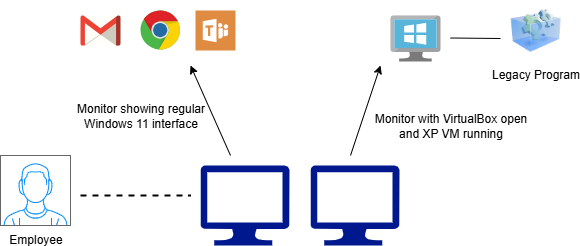
See: Create a Virtual Machine for Old Software (Tutorial)
Segmentation
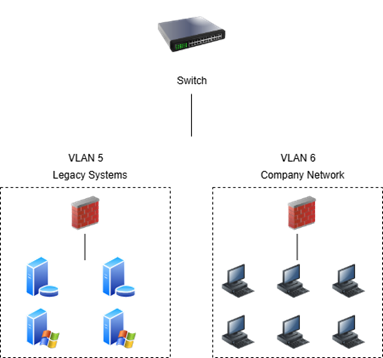
Virtual Local Area Networks, or VLANs, are a valuable networking feature that enhance the security posture of a LAN. By isolating a series of related devices in their own dedicated broadcast domain, a VLAN prevents various hosts of differing security levels from compromising one another.
This deployment is tailor-made for legacy infrastructure. VLAN segmentation allows you to put all your legacy devices in a single bubble. In the VLAN, the legacy hosts will have access to one another, but not to anything in any other VLAN on your organization’s network.
If an attacker were to compromise a legacy device and begin laterally moving throughout your network, they would be confined to communicating only with other legacy devices. The risk to your organization is lowered substantially since the attacker cannot pivot to resources in other VLANs on your network. Many legacy systems still need to contact the internet. If this is the case, then you can connect a router to the VLAN to allow it to communicate with other networks. You should also have a firewall sitting in front of the legacy systems VLAN. The firewall should be configured only to allow inbound traffic for ports that provide the bare necessities for the systems to operate.
Additional Security Measures
Beyond the larger changes to network design specified in the previous sections, other security implementations can be enabled on legacy infrastructure to narrow the attack surface. Legacy operating systems and software should be configured with generic user accounts that do not reveal the real identity of individuals working for your business. Any unprotected/unpatched technology should not be allowed into any established identity and access control management system you have in place for your business. Keeping legacy devices configured with a username such as XPUser55 will prevent a potential attacker from gathering information to pivot with. Strong passwords should be added to all user accounts, and should be known to only employees tasked with utilizing the systems.
Suppose a piece of legacy infrastructure is running on an old OS, such as Windows XP or Windows 7. In that case, you will not be able to effectively use Windows' built-in Defender to scan for malware because the signatures are not being consistently updated. However, some antivirus companies make software that continues to support such operating systems. It might be a good idea to look into products from security companies like Symantec or Avast to see if you can obtain a reliable antivirus program to continue securing older infrastructure.
By combining the virtualization and segmentation methods with the previously listed security controls, you can lessen some of the risks associated with running legacy infrastructure on your business network.