Content filtering should be used to block access to external domains hosting content deemed unnecessary/malicious by senior management.
Control Type: Technical
Control Function: Preventive
Description: Organizations often set expectations as to what Internet content is appropriate for the work environment and for viewing on company devices. These expectations should be outlined in the organization's Acceptable Use Policy (AUP). Organizations also need a method to enforce restrictions on Internet content within the workplace. Common examples of restricted content include malicious domains, social media websites, unvetted AI tools, pornography, and unauthorized data sharing sites. Proper governance should usually be able to emphasize content restrictions to employees, but additional controls are necessary to actively block access to restricted areas.
The Domain Name System (DNS) is the service that allows hosts to locate resources out on the Internet. Each piece of web content is hosted on a server with a public IP address. Accessing websites via IP addresses would be difficult and inconvenient. Therefore, DNS is used to associate a fully qualified domain name (FQDN) with an IP address. An FQDN is a unique identifier comprised of a hostname (www), a domain name (cyberladder), and a top-level domain (.io). When a client enters the FQDN into a web browser, DNS will be used to resolve the human-readable name into the numeric IP address of the appropriate web server.
Content Filtering prevents systems from using DNS to resolve the locations of restricted websites. Content filtering can range from simple (blocking a few choice blacklisted websites) to extremely granular (blocking access to entire categories of websites). At a minimum, businesses should implement content filtering to block access to compromised and malicious websites containing malware or social engineering content.
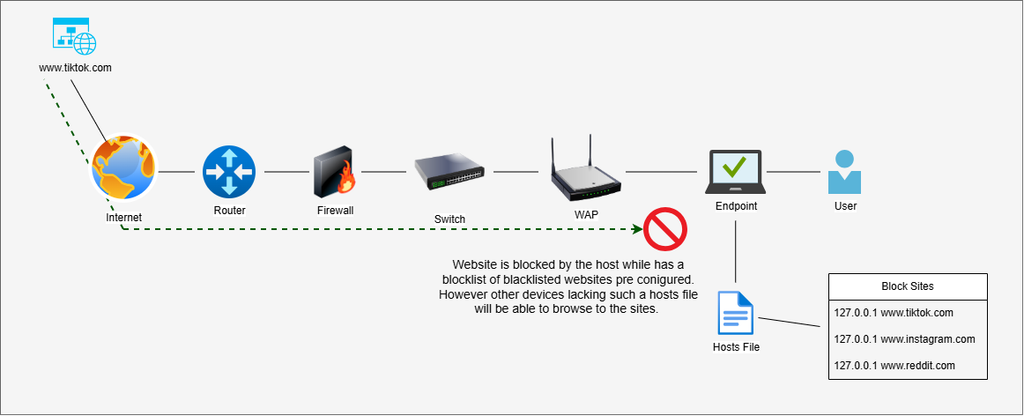
There are many solutions available to businesses that wish to implement content filtering on their networks. The most basic solution is to utilize host file blacklisting. The hosts file is a plaintext file present on all operating systems that specifies FQDN to IP address resolutions to be prioritized by the system. The hosts file is consulted before a DNS server is queried, meaning any resolutions listed in the hosts file will be immediately implemented by the operating system. A common technique is to place blacklisted websites in the hosts file with a specification for the website to resolve to the system's own local network adapter. We know that the websites are actually hosted on web servers out on the Internet, but the hosts file does what it is told and tries to access the website on the system's local address. This results in an error page being displayed, and the user being unable to access the website. Hosts file blacklisting is a good solution for organizations that wish to block select websites on their company assets only, not necessarily network wide. A master host files can be created by IT admins and then deployed on each of the company's endpoints. Blacklists of different website categories can be obtained from sources like GitHub and threat intelligence feeds.
A network-wide version of the hosts file blocklist involves utilizing a DNS Sinkhole. DNS Sinkholing is a content filtering technique that blocks access to websites by seizing network DNS requests for blacklisted domains and routing them to a non-routable IP address. This is essentially the same strategy used in host file blacklisting, only it functions network-wide. PiHole is a free and open-source DNS sinkhole that is known for its ease of installation and use. It can be deployed on a large dedicated server, but functions perfectly fine on small Raspberry Pis and Docker containers. PiHole is generally marketed as an ad-blocking solution, but it can be configured to block any range of websites that admins wish. There is a large community surrounding PiHole, and many web users publish free blacklists of content categories that can be imported into PiHole servers. The Blocklist Project on GitHub is a great source.
Organizations may not have available capital to spend on configuring local content filtering solutions. Luckily, there are many third-party content filtering solutions, both proprietary and open-source. Quad9 is a free DNS filtering service that emphasizes privacy and security on the Internet. Organizations only need to configure their routers to utilize Quad9's DNS servers. Quad9 will monitor the organization's DNS requests similar to an onsite DNS Sinkhole. If malicious domain names are detected by Quad9, it will block the clients from completing their query. There are also proprietary content filtering products that allow more granular configuration. Cisco Umbrella is one of the most popular and reputable content filtering solutions, and fits nicely with organizations that already utilize Cisco products in their network backbone.