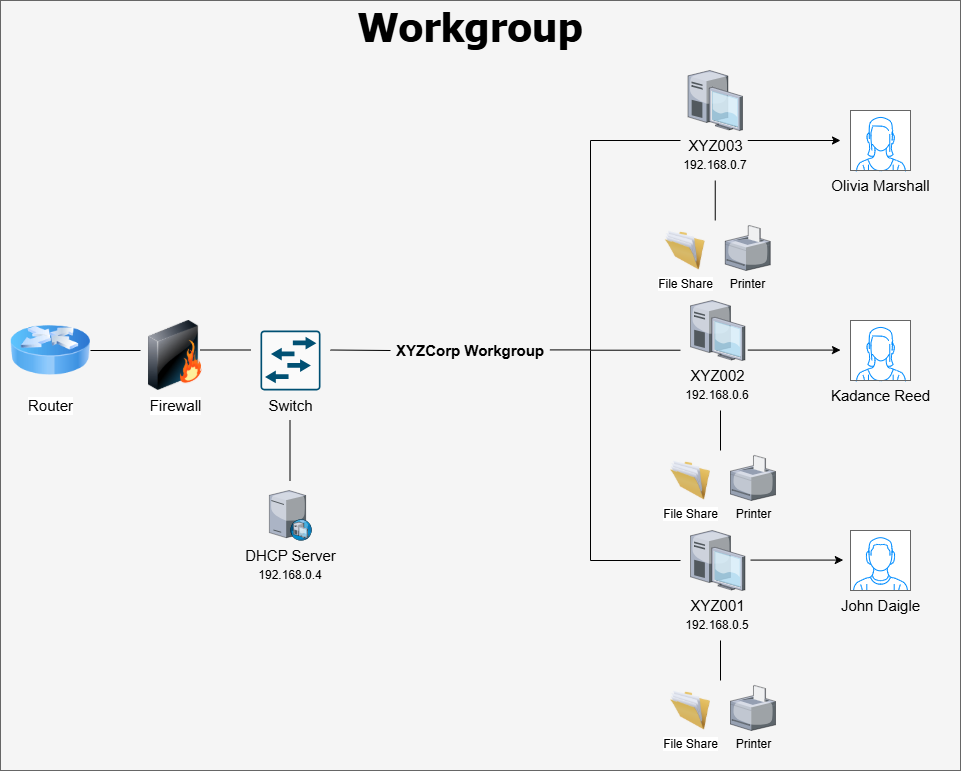
Workgroups could be used to organize Windows networks comprising less than ten local computers.
Control Type: Technical
Control Function: Preventive
The question of how best to organize an organization’s endpoint devices depends heavily on the size of the organization. For small organizations with less than ten employees, the easiest and cheapest approach to device management is the workgroup. Workgroups are the classic Windows approach to organizing and identifying Windows devices on a network.
In a workgroup model, all endpoints exist as standalone instances of Windows with no centralized management like Active Directory of Intune. Devices are given a unique hostname, configured to the desired state, then joined to the workgroup in Windows settings, which is simply a human readable name identifying the organization or department.
To view or change the workgroup on a Windows machine, go to Settings > System > About > Advanced System Settings > Computer Name.
Windows devices are connected to a default workgroup simply called WORKGROUP out of the box. The only requirement for creating a workgroup is that all devices in the workgroup reside on the same subnet. Once endpoints are in a workgroup, they retain their autonomy over the local system but gain options for easier file and printer sharing.
Since workgroup devices are standalone systems, the user accounts configured on each device are basic local accounts with no centralized identity and access management. However, the local users can choose to share resources such as a department file share or their local printer with the rest of the workgroup. Other computers in the workgroup can see the shared resources on the network and connect to them. The issue is that to authenticate to shared resources, users need to be recognized by the computer hosting the shared resources. This means that in a workgroup of six users and computers, each user needs to have an account with the same username and password on all six computers. This can quickly become a nightmare to manage.
For more efficient resource sharing in a workgroup, organizations should instead utilize network-attached storage devices and file servers hosted on a dedicated system on the local network. Users should have separate accounts on the server that they use explicitly for the network resources. This way, users can view and collaborate on files without needing to share them from their local devices or have user accounts on other users’ computers.