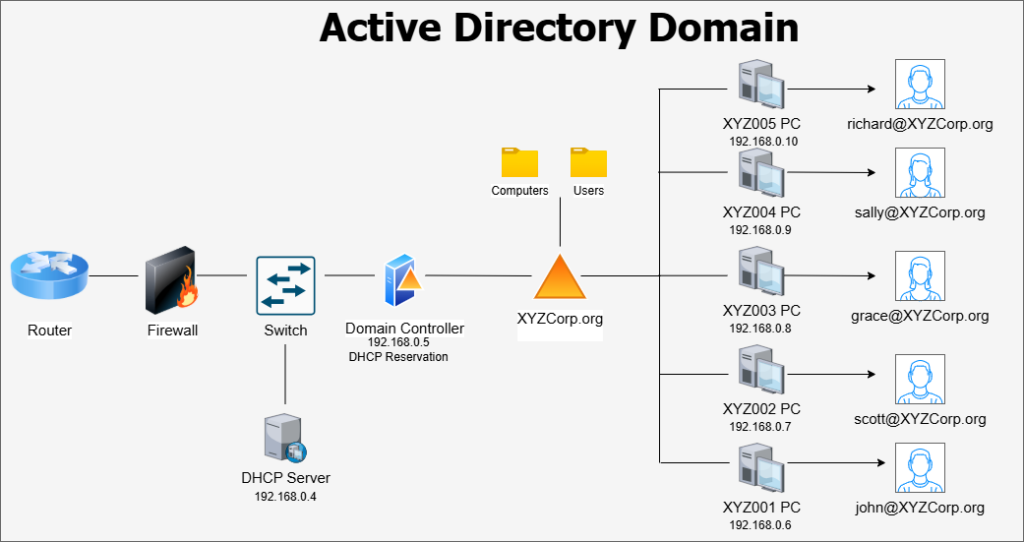
The workgroup model of Windows device management often suffices for environments with less than ten users and computers. However workgroups can quickly become difficult to manage and properly track. Once an organization hits more than twenty devices, managing each computer as a standalone system becomes pretty much impossible. This is why business employ professional device and network management platforms to centralize control and visibility over their devices, the most famous of which is Active Directory.
Active Directory Domain Services, a feature of the Windows Server OS, has been a staple of enterprise IT management since the very start of the 21st century. Active Directory allows organizations to centralize network resources, including users, computers, and groups, within a Windows domain (ex, mycompany.org). The domain stores its resources on one or more Windows Servers called Domain Controllers. In a domain network, the organization’s local identities, computer configurations, and security policies are all managed centrally, providing greater control over device settings and network security.
Windows Server is a pricey operating system, and it can be tough to justify the cost for a smaller business. Pricing for Windows Server 2025 can be found here. The general rule passed around in IT is that any business with more than ten users and computers should implement Active Directory. Generally, any business encountering issues with device management and accountability should at least consider switching to a domain-managed network structure.
One of the most powerful features of an Active Directory Domain is Group Policy Management. Group Policies are security templates where administrators can configure very granular settings for endpoints attached to the domain. Everything from desktop appearance settings to networking behaviors can be configured through Group Policy. In addition to Windows settings, some major software programs offer templates that can be imported into the Group Policy dashboard to configure settings for those programs. These templates are downloaded in ADML/ADMX format.
Building an Active Directory Domain is a complex process that requires a certain level of experience with Windows Server and LAN concepts. If a business's senior management believes that it requires an AD Domain for better network resource management, it must ensure that the prospect is thoroughly reviewed with a risk assessment conducted on the potential effects of switching. Are there qualified IT staff within the business who can build the domain from scratch? Will a third-party IT consultant be needed to build it? Are the endpoints currently on the network capable of connecting to a domain? All of these issues should be addressed, and a cost-benefit analysis should be prepared. If implementing a local Active Directory domain is not feasible, or if the business utilizes primarily mobile devices in its environment, it may be appropriate to look into an alternative method for device management, such as Mobile Device Management (MDM) platforms.