
Active Directory Domain Services, a feature of the Windows Server OS, has long been a staple of enterprise IT management. Active Directory allows administrator to centralize network resources, including users, computers, and groups, in a Windows domain (ex: mycompany.org). The domain stores its resources on one or more Windows Servers called Domain Controllers. In a domain network, your organization’s local identities, computer configurations, and security policies can all be managed centrally, providing you greater control over your network security.
Windows Server is a pricey operating system, and it can be tough to justify the cost for a smaller organization. Pricing for Windows Server 2025 can be found here. The general rule passed around in IT education is that any organization with more than ten users and computers should implement Active Directory. If your organization size fits in that description, and if you have noticed difficulties in managing your network, then Active Directory may be for you.
One of the most powerful features of an Active Directory Domain is Group Policy Management. Group Policies are security templates where administrators can configure very granular settings for company workstations. Everything from desktop appearance settings to networking behaviors can be configured through Group Policy. In addition to Windows settings, some major software program offer templates that can be imported into the Group Policy dashboard to configure security settings for those programs. These templates are downloaded in ADML/ADMX format.
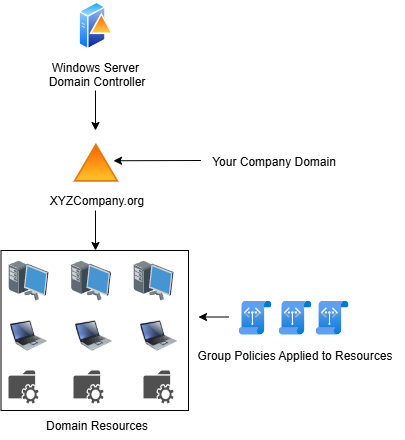
If your organization has less than ten users/computers and cannot justify the cost of Windows Server licensing, you can still use Group Policy configurations via the Local Group Policy. Windows Pro, Enterprise, and Education versions contain the Local Group Policy, which allows Group Policy settings to be configured on standalone non-domain joined workstations.
As part of this framework, I developed a baseline Local Group Policy containing security settings in compliance with the CIS Benchmarks for Windows 11 and Microsoft Edge. I also imported and configured security templates for Google Chrome, Firefox, Microsoft Office, Zoom, One Drive, and Dropbox. You can download the exported LGPO below, and then use the tutorial to import the policies into any workstations in your organization.