
As you learned in this framework’s documentation on Device Management Strategies, there are various models that can be used to integrate employee devices into your workflows. Generally speaking, Bring Your Own Device (BYOD), is the most common model used in your average medium to small business. Employees enjoy the convenience of being able to use their own devices for daily workflows, and management often finds that productivity is helped by having the seamless transition between home and work. However, BYOD can pose many severe risks to your organization’s cybersecurity posture if you do not implement it properly. To mitigate these risks, it is essential that you draft a BYOD Policy that outlines the key requirements employees must fulfill if they wish to use their personal devices for work.
BYOD Scope: you must clearly define who is allowed to use their own personal devices for work. In a small business environment, you generally will allow everybody to bring their own devices. However, there may be circumstances where this is not true. If an employee or department performs highly specialized work that cannot translate well to a personal device, you may want to exempt them the BYOD scope. You should also clearly define what devices you expect employees to use for work. Laptops of any major brand are almost always the target device of BYOD policies. Therefore, it may make sense to disallow use of tablets or mobile phones if there is little context where they would be practical for work. You can narrow down allowed devices even further. For example, most of your workflows may take place using Windows only software, thus it would make sense to mandate Windows devices for BYOD.
Device Compliance: there is no reason for you to just allow any old laptop to be connected to your company resources. You are opening your network to severe risks if you do not place any minimum-device compliance standards. Therefore, your BYOD policy should clearly state minimum system requirements. These should include:
- Minimum OS version, such as Windows 11 25h2 or macOS Tahoe
- An anti-malware program installed and enabled (Windows Defender, Malwarebytes)
- Host firewall enabled
- Multifactor authentication enabled for sign in
It is not enough to expect employees to adhere to these requirements, you must enforce them. Luckily, there are technologies that exist to help with this. In the context of a small organization, you may have to consult with your cybersecurity team to determine if these technologies are financially justifiable. However, if your organization makes significant use of BYOD activity, it is highly recommended to embrace them.
Network Access Control (NAC): this is a system that stops devices when they attempt to sign into your network and studies them to ensure compliance. Think of NAC as a traffic checkpoint for computers. Employee personal devices will usually be checked after they enter their credentials to log in to the network, but before they are given access. If the device meets the minimum requirements for network compliance, the employee is allowed to connect and begin working. However, if the device falls short of the requirements, access will be denied. Oftentimes, NAC will then direct the employee to a special screened subnet containing file servers that allow them to install the necessary features to bring their devices up to compliance.
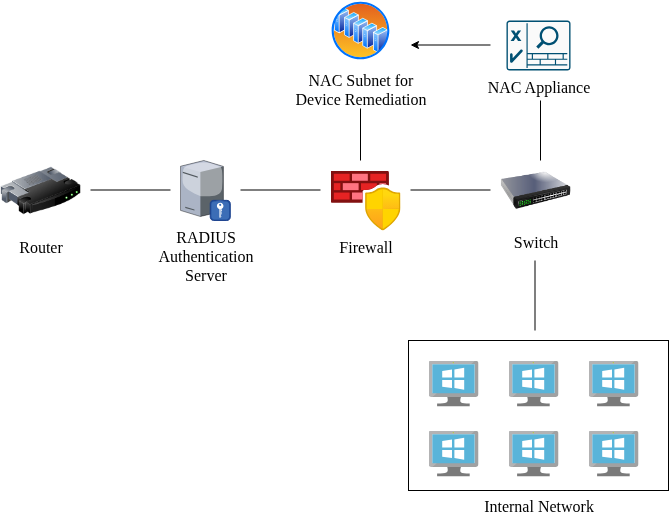
Conditional Access: commonly associated with Microsoft Azure, this technology dynamically decides whether to permit users/devices access to internal resources based on real-time factors. Conditional access is more an algorithm than a visible piece of technology. It combines factors like device compliance intelligence, malware infection status, location, time of day, and other attributes of the BYOD device and mixes them with additional intelligence like threat info and network security history. This large pool of information will result in the conditional access system deciding on whether the BYOD entity will be permitted access to company network resources.
Appropriate Usage of Organizational Data: since data is your organization’s most important asset, great care needs to be taken before allowing external devices to access it. Figuring out how to maintain control over your company’s data while it is being used on an employee’s device is probably the most difficult part of implementing a BYOD policy. A lot of it depends on the context of your organization. For example, if you run a wedding photography service with a friend, it is pretty simple to isolate work data from your personal device. You could simply use a separate web browser for accessing work-related data only and save any files to an SD card rather than on your computer’s hard drive. However, if you run a commercial realty company with ten employees that regularly process confidential and restricted data, you are going to want to implement a more thorough method for protecting company data while employees use their personal devices.
One method is to use Mobile Device Management (MDM). By implementing these technologies, you can create a company managed cloud account for each employee and mandate that they sign into them on their personal devices before doing any work. This way, employees are using their personal devices, but at the same time are using an account under your complete control to do their work. When they go home for the day, they simply sign out of the work account and back into their regular PC account. This way all of your company data remains attached to a cloud account maintained and supervised by you, even if a third-party device is being used to access it.
Another extremely useful technology to consider is Data Loss Prevention (DLP). A DLP system monitors company-attached devices and the use of company data on them. If the system detects that sensitive data is leaving the organization’s perimeters and/or is going to a suspicious entity, it will block the transaction and likely report them to administration.
For optimal BYOD security, consider a combination of any of the technologies outlined in this documentation. Just ensure that they are cost effective, make sense in your organizational context, and clearly communicated to employees.
Employer vs Employee Rights: as you likely have gathered, there is a bit of a quagmire that comes from allowing employee-owned devices to access company data. It can get murky when trying to find out where ownership is transferred. To make things easy, ensure that you clearly define delegation of rights in your BYOD policy. For example, you may let employees know that they are responsible for the machine itself and have all rights to it, but that you own the accounts used to access company resources and the data attached to them. You should clearly state that you have the right to monitor and revoke access to all resources defined under your ownership, even if they visually exist on the employee’s machine.
Protocols for Loss/Theft and BYOD Unenrollment: since employees are responsible for their devices, there is always the possibility that they will be lost or stolen. In a BYOD scenario, this is an immediate concern as the employee-owned devices have been used to access company resources, and there is no guarantee that the data won’t be accessed by an external actor. Luckily, most MDM platforms contain features for remotely wiping devices and/or removing profiles. This way company data can be removed from a device when an employee reports it missing. It is still up to the employee to report the device lost or stolen, so this responsibility must be clearly communicated to them. There is also the chance that an employee may be fired or moves on to a different job. In this case, most of the same procedures should apply. Company accounts should be disassociated from the employee’s personal devices, and any methods used to access company data should be disabled for the employee.
Example Policy
 Loading...

 Reload document
  Open in new tab