
Organizations SHALL identify the applicable standards for network cabling and ensure that cables are installed according to defined secure cabling procedures, such as running cable through conduits and maintaining a cable register.
Control Type: Physical
Control Function: Preventive
Description: Cables are the core backbone of a computer network. Businesses purchase Internet Service from their choice of ISP. The ISP will connect its line to the business facility from the exterior. A demarcation point in the location where the business takes over networking from the ISP. Networking devices such as routers and switches are configured, strung together with cables, and connected to endpoints throughout the facility. While cables may seem like a basic component with little effect on security, they are actually a critical piece of infrastructure that controls the availability of network resources. Best practices shall be implemented with all network cables to ensure that they remain safe and functional, and do not physically interfere with other parts of the facility.
The majority of basic business networks utilize the Ethernet standard defined by the 802.3 standard. There are three types of cable utilized in Ethernet networks: coaxial, twisted pair, and fiber optic.
Coaxial: Cables have a conductor that runs down the center of the cable. This core is surrounded by a layer of insulation, then a conducting shield to protect transmissions from interference. The cable is then fully encapsulated with a plastic layer. Coaxial cables are not optimal to install, but they do allow for longer cable lengths. There are two types of coaxial cables:
- Thinnet: Older and easier to install, with a diameter of 0.25 inches. However, it does require grounding, meaning it isn’t widely used in networks anymore.
- Thicknet: Has a diameter of 0.38 inches and can carry longer distances.
Fiber-Optic: Once an expensive luxury, fiber optic networking is now being widely implemented in business and home environments. Fiber optic cables are made of glass and plastic fiber strands running through several layers of protective shielding. Fiber optic cables transmit data through light signals, giving them more speed and bandwidth. They are also immune to Electromagnetic Interference (EMI). However, fiber optic remains pricey, meaning businesses will need to do a careful cost-benefit analysis before deciding to implement it. Fiber optic cables come in two types:
- Single-Mode: Smaller core with one strand of fiber, meaning it can only transmit in one direction. It can span larger distances, up to 100km.
- Multi-Mode: Larger core with multiple strands of fiber, meaning it can transmit in two directions, sending and receiving. It spans shorter distances, generally maxing out around 500 meters.
Twisted-Pair: These cables are what we normally think of when we talk about Ethernet. Cables are made of pairs of wires that are twisted together to protect against EMI and crosstalk. The twisted pairs create circuits via which data can be transmitted. Each twisted pair cable is terminated with an RJ-45 connection on both ends. There are two types of twisted pair cable:
- Unshielded Twisted-Pair (UTP): The cheaper and more common type, these cables are light and easy to use, but lack a protective shield around the wire pairs. This makes UTP cables more vulnerable to EMI.
- Shielded Twisted-Pair (STP): These cables provide the same functionality as UTP, only they wrap the wires in a foil to protect data transmissions from EMI. The shield needs to be grounded at both ends. The added functionality of the shield makes STP more expensive than UTP.
The individual wires in twisted pair cables come in the following colors: Orange, Brown, Blue, Green, Brown-White, Blue-White, Orange-White, and Green White. The two ends of the cable need to have their wires aligned in a specific order to function. The Telecommunications Industry Association defines two standards for aligning the wires: TIA/EIA 568A and TIA/EIA/568B.
The TIA/EIA 568A standard is wired in the following order:
- Green-White
- Green
- Orange-White
- Blue
- Blue-White
- Orange
- Brown-White
- Brown
The TIA/EIA 568B standard is wired in the following order:
- Orange-White
- Orange
- Green-White
- Blue
- Blue-White
- Green
- Brown-White
- Brown
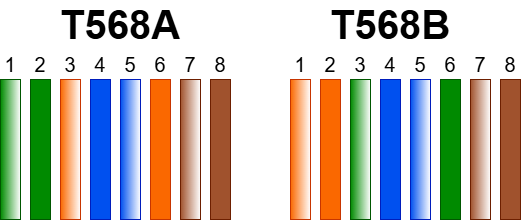
The way a cable is wired depends on what it is going to be used for. Straight-Through Cables are twisted pair cables used to connect different types of devices together. For example, a workstation to a switch. Straight-through cables use the same wiring standard on both ends. It can be either TIA/EIA 568A or TIA/EIA 568B.
On the other hand, Crossover Cables are used to connect devices of the same type. For example, connecting two switches or two workstations. Crossover cables need to have a different wiring standard on each side: one side must be TIA/EIA 568A and the other must be TIA/EIA 568B.
The speed and maximum length of twisted pair cables depend on the category they are assigned to. The category is determined by the frequency and signal-to-noise ratio of the cable. The currently accepted categories are listed below.
| CATEGORY | NUMBER OF PAIRS | FREQUENCY | SPEED | MAX DISTANCE | USE |
| CAT1 | 1 | 400KHz | 1Mbps | 100M | Telephone |
| CAT2 | 2 | 4MHz | 4Mbps | 100M | Token Ring |
| CAT3 | 3 | 16MHz | 10Mbps | 100M | 10BASE-T Networks |
| CAT4 | 4 | 20MHz | 16Mbps | 100M | Token Ring, 10Base-T Networks |
| CAT5 | 4 | 100Mhz | 100Mbps | 100M | 100BASE-T Networks |
| CAT5E | 4 | 100Mhz | 1000Mbps | 100M | 1000BASE-T Networks |
| CAT6 | 4 | 250Mhz | 1000Mbps | 100M | 1GBASE-T Networks |
| CAT6A | 4 | 500Mhz | 10Gbps | 100M | 10GBASE-T Networks |
| CAT 7 | 4 | 600Mhz | 10Gbps | 100M | 10GBASE-T Networks |
| CAT 8 | 4 | 2000Mhz | 40Gbps | 30M | 40GBASE-T Networks |
Today, all twisted pair categories before CAT-5E are basically deprecated. As of 2026, Cat 6 is the most used standard, as your average network supports 1GB speeds. Businesses need to ensure that they implement the category of cable that supports the networking speed they are paying for. If a business is paying for 1GB Internet, but uses CAT5, its network activity will be restricted to the CAT5 max speed of 100Mbps. Many larger organizations are moving towards 10GB Internet, meaning CAT6A and CAT7 need to be introduced.
Special attention needs to be given to how network cables are run within the facilities of a business. Poor cable management is all too common and can result in the availability of digital infrastructure being compromised. Depending on the business size, cables may be run either by the business staff themselves or a third-party contractor. Regardless of who installs cables, a checklist of proper cabling security procedures needs to be established and followed. Below is a list of typical best practices for the secure implementation of network cables.
- Maintain a cable register documenting the installation and path of each cable installed in the facility. The register must be properly updated, stored, and verified regularly. Each entry in the register should track the following attributes:
- Cable ID
- Cable Color
- Sensitivity (derived from the sensitivity label of the asset connected to the cable)
- Source (Room Number, Switch/Patch Panel ID)
- Destination (Room Number, Asset Tag)
- Location(s) (The ceilings and rooms the cable is run across)
- Floor plan diagrams should be created with the location of each cable within the facility properly labeled. This can be done either by creating a dedicated floor plan diagram for cables specifically, or by overlaying the Site Survey diagram created in Stage 1 of this framework.
- The organization should develop a cable labelling scheme with unique cable IDs attached to each cable using tags. For smoother cable management, organizations should consider appending individual tags every 16 feet of cable length.
- Cables should use a consistent color. Twisted pair cables classically come in the color blue, but newer cables are increasingly using the color black. Regardless of the chosen color, it should be universal across the organization. An even better approach is to assign a different color to each sensitivity level. For example, cables connecting to low-sensitivity assets could be blue, cables connecting to medium-sensitivity assets could be black, and cables connecting to high-sensitivity assets could be red.
- Cable conduits should be easily accessible. This doesn't mean leaving cables exposed, but it does mean constructing cable flows in such a way that they can be easily tracked and inspected for troubleshooting.
- Cable sensitivity types should not be mixed. For better overall security and management efficiency, cables of the same sensitivity level should be run through the same conduit and not mixed with those of other sensitivity levels.
- Wall outlet boxes on the end of cables should clearly identify the attached cable ID.
- Cables that are run through plenum spaces, such as ceilings, must use plenum-rated cable.