
The concept of a password is one that anyone who has interacted with a computer should be familiar with. Even with the rise of new Passwordless Authentication technologies, the classic username and password combo remains the preferred choice for the first authentication factor in a system.
Compromise of passwords remains a severe threat. Password attacks continue to be effective in causing data breaches and account compromise. The top defense for password attacks has always been to create a strong password. What constitutes a “strong password” in today's environment usually looks something like the following:
- For user account passwords in the workplace, aim to require users to set passwords with a minimum of 12 characters. 8 characters is usually an acceptable password length, but for better security, encourage employees to aim for 12 to 15 characters in their passwords.
- The consensus used to be that passwords should prioritize complexity over length. A password such as $UyB_125%was often considered best for security. The trouble is that these passwords are not particularly memorable and will generally be forgotten by their user. To remember the password, the user may write down their password on a sticky note attached to their monitor. This presents a severe security vulnerability right out of the box. Administrators should still enable Password Complexity Requirements for their network, but they should avoid being too stringent with the range of characters.
- If complex, easily forgettable passwords are not the way to go now, then what is? Nowadays, there is a shift towards recommending longer passwords that are less complex but more memorable to the user.
- Going a step further, it can be effective to recommend that employees aim for Passphrases rather than passwords. Passphrases will likely be more memorable to the user and, depending on how specific and personal they are, can be much more secure against attacks. For example, I have been on a US history kick recently. When tasked to create a password, I set it as Brooke$hieldsDesert$torm1991. Not only is that going to become second nature to me after a few logins, but your average attacker is going to have a difficult time cracking it.
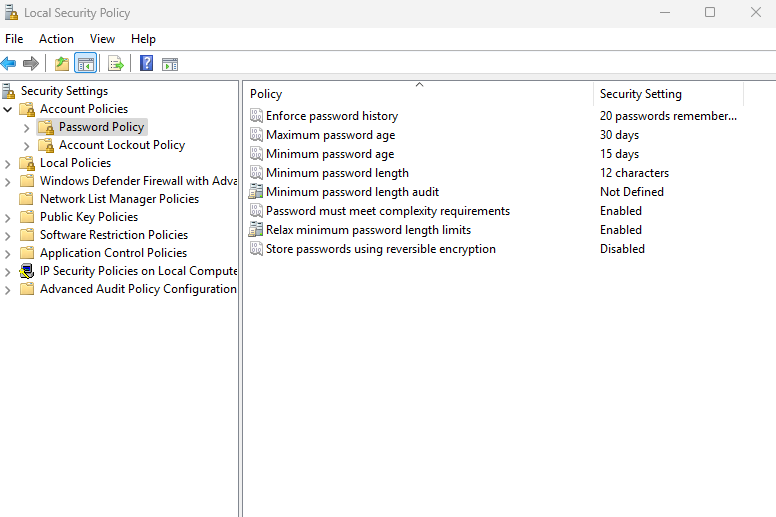
Defining reasonable requirements for password creation may be the largest part of a Password Policy, but it is far from the only one. It is not secure to allow users to keep the same password forever or keep returning to the same password every other change cycle. To address these risks, include password rotation rules in your policy.
- A password change should be mandated every 30 to 90 days. I understand it is a nuisance to everyone on the receiving end, but I advise mandating a change every 30 days.
- Password history should be enforced to prevent users from just cycling back to the same password. Set a password history requirement of between 15 and 20 new passwords.
- Enforce a minimum password age in addition to a maximum password age. This prevents users from cycling through multiple passwords in short sprints to try and reset the password history requirement.
After clearly defining these requirements, you have a pretty good Password Policy for your business. Make sure to lay down the requirements in clear, understandable terms and elaborate on them if required by employees.
Example Policy
 Loading...

 Reload document
  Open in new tab