
The amount of data that is processed, transmitted, and stored daily is nothing short of astounding. Data is probably the most important asset of any business of any size. While many may associate large volumes of data with complex enterprises, the truth is that even the smallest of businesses handle huge amounts of data daily. This data can range from meeting minutes, to plans and blueprints, to financial documents and purchase orders, to personal information about customers and employees. With this kind of data moving around the Internet, it is no surprise that threat actors are waiting to pounce and cause great harm to any entities they can.
Data breaches are one of the most devastating results of cyberattacks, and they are becoming increasingly common by the year. One of the worst mistakes a business owner can make is assuming that they are not vulnerable to data breaches because of their business size. This could not be further from the truth, as small businesses are increasingly being targeted specifically because of their size and general security posture. If you want your business to be “secure”, locking down your business data from threats is a necessity, not an option.
Before you implement any security controls on your business data, you need to start by investigating what data you possess and classifying it in an organized inventory. To break down this sometimes-daunting task, you should start by understanding what classification levels of data exist and how they apply to your organization.
The following are the standard four classifications of business data:
- Public Data: data that can be accessed and shared publicly with no damage to your business. Oftentimes, the fact that this data is public is the entire point. Examples include advertisements, flyers, business contact information, public surveys, property tax information, and published data sets and reports.
- Internal Data: data that should be limited to sharing and viewing by appropriate staff inside your business. This data may have a moderate impact on your business if revealed publicly. A breach of this data should be met with immediate concern, investigation, and remediation, but it is still not the end of the world. Examples are any data that is produced and controlled by a department in your business, such as sales analysis, cash flow reports, budgeting data, IT logs, customer purchase histories, and intra-department correspondence.
- Confidential Data: data that must be limited to access by approved, validated employees on a Need-to-Know Basis and protected with tested controls such as encryption and access control mechanisms. A breach of this data will likely result in a high negative impact on your business and stakeholders. Examples of confidential business data include trade secrets, financial transactions, financial statements, research findings, and pricing strategies.
- Restricted Data: data that is highly sensitive and must be limited to access by a small group of approved, vetted individuals. Access to this data must be continually validated using a Zero-Trust approach, and multiple layers of security controls should always be in place. A breach of this data will likely have a severe negative impact on your business and stakeholders, with drastic consequences such as legal issues, reputational damage, and bankruptcy. Examples of this data are Personally Identifiable Information (PII) of customers and employees, detailed business financial data such as credit card and bank account numbers, and Protected Health Information (PHI) of customers and employees.
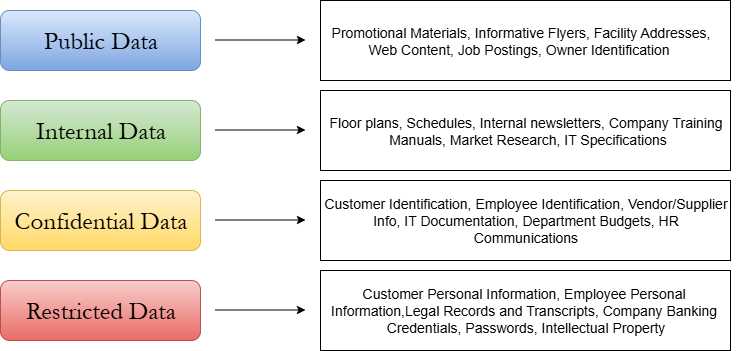
After reviewing the above four classification levels, you should already be thinking of examples of each level present in your organization. At this point, you can begin listing these examples in a data classification inventory. However, before going too far, you should be aware of some more key terms and concepts regarding data sensitivity and classification.
Personally Identifiable Information (PII): PII is any information that uniquely identifies an individual or can identify an individual when combined with other information. PII is extremely sensitive, and it is an expectation among customers that businesses do their best to protect their PII. A data breach on a company that reveals PII reflects very poorly on the affected company and often will result in legal issues.
Examples of PII include:
- Names, including maiden and aliases
- Social Security Number (SSN)
- Passport Number
- Driver’s License Information
- Credit Card Numbers
- Bank Account Numbers
- Home addresses
- Personal email addresses
- Biometric data (fingerprints, retina scans)
- Other detailed personal characteristics (facial geometry, gait, handwriting, etc.)
Protected Health Information (PHI): PHI is any health information that is directly associated with an individual. PHI is tightly regulated, and mishandling will likely result in major legal issues. PHI is so sensitive due to its potential use in identity theft, and the embarrassment or distress its revelation can cause subjects. PHI is regulated under HIPPA and is likely not a major part of a small business digital environment.
Examples of PHI include:
- Test results
- Medical scans
- Doctor’s notes
- Biometric data
- Payment information
- Insurance information
Now that you have a steady grasp on the different categories of data, you can begin auditing your digital environment and taking note of the data present. Common pieces of data found in small business environments include shipping orders, invoices, memos, accounting books, customer contact information, schedules, and advertising data.
A good practice is to note the different data sources in your environment first, then review them to determine the category they belong in. You can also involve the cybersecurity team in the classification process for additional opinions. Taking your time on classifying data will reduce the chances of any data being put in the wrong category.
Once you have your business data properly categorized, you can use the spreadsheet provided below to document it.