
One of the goals of this framework is to highlight the increasingly necessary reliance on decentralized, web and cloud-based technology for business workflows. One burning question arises with the migration away from traditional perimeter-based networks: how do I prevent employees from knowingly or unknowingly moving data outside of businesses systems into the open Internet?
Alas this is a perfectly valid concern and is often one of the issues making business owners wary of upgrading their organization’s digital infrastructure. Luckily, there is a powerful tool that can be used to shield your organization from unauthorized data exfiltration. It is called Data Loss Prevention (DLP).
DLP is a software security control that every organization of any size should implement. DLP works in the background while company users perform their daily workflows. A set of rules are in place for DLP to act on. These rules specify categories of data that should not ever leave the organization’s infrastructure. If DLP detects a user trying to send out any sensitive data, it logs and blocks the activity.
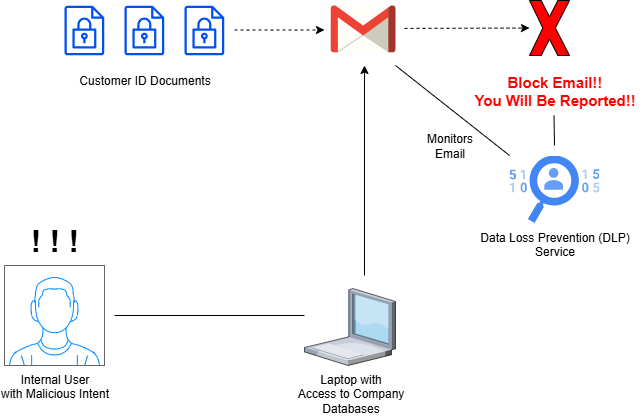
DLP can handle a variety of different scenarios in which company data is involved. It can monitor data in use and data in motion. In this scenario, DLP will monitor the use of software like Microsoft 365, AI tools like ChatGPT and Gemini, email clients like Gmail, and meeting tools like Zoom and Teams.
DLP can also monitor data at rest. This includes the use of desktop operating systems like Windows and macOS, network file shares, cloud file storage programs and applications, and desktop software.
Many professional DLP solutions utilize Machine Learning (ML) to help strengthen the programs and sharpen its detection capabilities. DLP can be configured to identify sensitive data using several methods.
- Keyword or Dictionary Matching: words like confidential, restricted, patient name, or phone number
- Pattern Matching: admins define certain patterns of characters that represent categories of sensitive data, such as XXX-XX-XXXX for Social Security Numbers or XXXX-XXXX-XXXX-XXXX for credit card numbers
- Exact Data Matching: uses hashes of exact pieces of sensitive data and compares those hashes with data being prepared for exfiltration
More advanced methods used by DLP include:
- ML Classification: uses ML to study company data sets and determine more specific pieces of sensitive data like memos, legal agreements, and documents with financial information.
- Contextual Analysis: this method factors in additional context like the geolocation of the activity and the destination party when deciding whether to block the exfiltration
DLP is not always a single piece of software. Many individual applications offer their own DLP specifically for use with that application. Two main deployment strategies are:
- Single Channel DLP – protects a specific channel of communication like web or email clients
- Enterprise-wide DLP: protects all corners of an organization’s digital infrastructure, regardless of vendor or channel.
For example, Zoom allows administrators to set DLP controls for chat activity in Zoom meetings. This application is specific to Zoom. On the other hand, Microsoft Purview is a powerful governance solution provided as part of professional Microsoft 365 subscriptions. One of the main features included in Microsoft Purview is DLP, which can cover not just Microsoft 365 applications, but enterprise-wide systems and applications as well.
In today’s digital landscape, DLP is one of the most powerful security controls a business can implement. Even if your organization still uses a traditional perimeter-based network, DLP is worth implementing to help mitigate insider threats and assist firewalls and intrusion detection systems with detecting inconspicuous data exfiltration attempts. Regardless of the specifics of your network design, you should absolutely prioritize implementing DLP if your organization handles any amount of Personally Identifiable Information (PII).