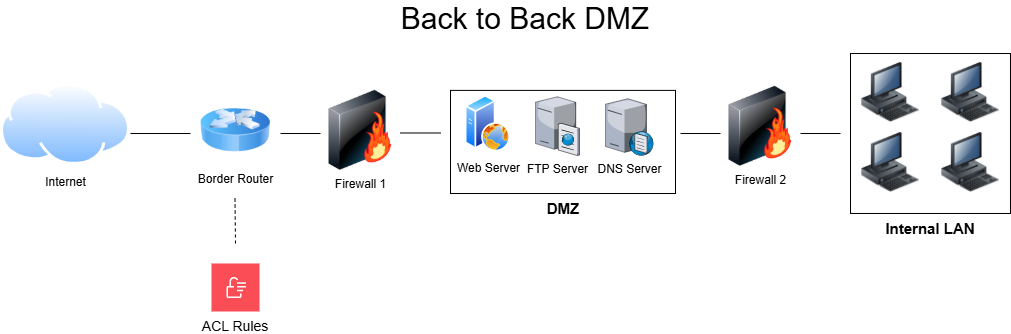
Systems and services designed to be accessed by public networks such as the Internet SHALL be placed in a properly configured and managed Demilitarized Zone (DMZ).
A Demilitarized Zone (DMZ) is a network segment that confines public-facing, high-risk systems to a dedicated network segment away from sensitive internal assets. The most basic DMZ design involves placing the high-risk systems between an organization's border router and firewall. The internal company network sits safely behind the firewall, while the high-risk systems sit in their dedicated network segment exposed to public Internet traffic. Systems in the DMZ are now accessible from both the public Internet and the internal network. Because the firewall is placed between the DMZ segment and the internal network, suspicious traffic that may compromise the DMZ is halted from entering the internal network by the firewall. The security of the systems in the DMZ can be enhanced by implementing Access Control Lists (ACLs) to allow/deny traffic destined for the systems. This DMZ configuration is sometimes referred to as a screened subnet.
While the screened subnet DMZ design is simple and easier to implement, a more secure approach is to use two firewalls, one placed behind the border router and another placed between the DMZ and the internal network. Now there are two security checkpoints, one protecting the DMZ and a second protecting the internal network. This DMZ configuration is referred to as a back-to-back DMZ.
A third method of creating a DMZ uses a single firewall with three interfaces. One interface connects to the external Internet, another connects to the private internal LAN, and a third connects to the DMZ. This configuration is known as a three-legged firewall. This configuration may be more cost-effective, yet it poses a level of risk since it involves a single network device, hence creating a single point of failure. A three-legged firewall configuration requires selecting a firewall capable of meeting the performance requirements for controlling three different network segments. This configuration is best created with a single powerful device that combines router and firewall functionalities, such as the open source pfSense.
Many smaller organizations have decided to outsource management of their public-facing services to third-party cloud providers. For many businesses, this solution is more cost-effective and in line with their risk appetite. This decision is up to you and your senior management. If you do decide to host any public-facing services on your network, you must designate them to a DMZ to shield your internal network from the risks posed by public-facing systems.
Systems/services that must be moved to a DMZ include:
- Public web servers
- Authoritative DNS servers
- VPN concentrators/gateways
- FTP servers designed for Business to Business (B2B) or Business to Consumer (B2C) transactions
- Proxy servers