
Encrypting data has become a mandatory cybersecurity control in today’s digital landscape. We now exist in a world where we must assume that any computer network is untrustworthy, and our private data needs to be shielded from malicious actors. Data encryption allows users to take their sensitive data in its “plaintext” format, run it through a cryptographic process, and take the resulting “ciphertext” to send over an untrusted network. However, transmitting data is not the only area where data encryption is necessary. In today’s world, we can no longer completely trust our own internal networks. Thus, our data needs to stay encrypted even when it's dormant in our own business networks. Cryptography and data encryption can be complicated topics for those without much cybersecurity experience. This documentation will explain the basics of cryptography and its use in securing business data.
Data States
There are three generally accepted states that data can exist in. Your small business network has thousands of examples of each data state residing within it right now. To understand the different implementations of data encryption, you need to understand the mechanics of the three data states:
Data-at-Rest: this is data that sits on a storage device and is not actively being used. Every file and folder you have on your work PCs and file servers is an example of data at rest.
Data-in-Transit: This is data that is in the process of moving from one source to another. If your business makes heavy use of cloud file storage platforms, then data in transit regularly occurs in your environment, as individual pieces of data are being moved from your office network to the cloud provider's network.
Data-in-Use: This is a less common data state, but it still deserves to be noted. Data in use is any data that is actively being queried on a system for use in a process. If you use collaboration platforms that allow employees to work on the same document at the same time, then the document is data in use. If you run an e-commerce website, then the transactions occurring on the e-commerce platform are also data in use.
Cryptographic Methods
There are a variety of approaches to using cryptography in a digital environment. The approach you use depends on what data state you are trying to protect, as well as what part of the CIA Triad you are trying to uphold. Below are the main cryptographic methods that are used to protect data.
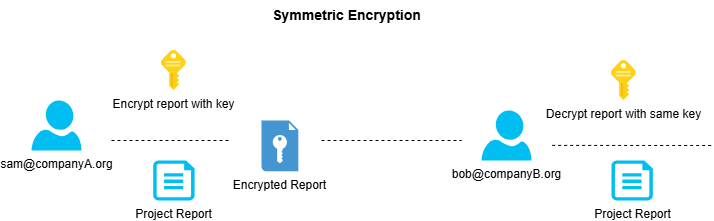
Symmetric Key Cryptography: Also known as secret key cryptography or private key cryptography, symmetric encryption algorithms use a single key for both encrypting and decrypting data. It is best for situations where large amounts of data need to be encrypted in bulk. Both the sender and receiver have a single key, with the sender using it to encrypt the data and the receiver using it to decrypt the data. The issue with this approach is that since the same key is used both ways, attackers can catch up and find the secret key rather quickly, resulting in the need to rotate keys regularly.
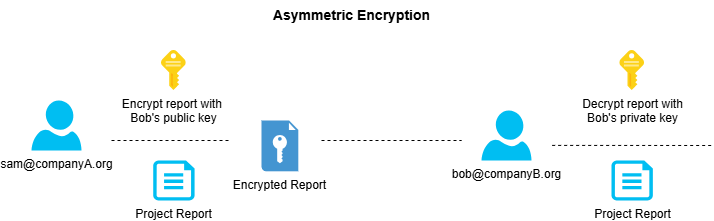
Asymmetric Key Cryptography: Also referred to as public key algorithms, asymmetric encryption algorithms use two pairs of keys for the data encryption process. The sender and receiver both have their own public-private key pairs. They are allowed to share their public keys over unsecured networks, but must keep their private keys secret. When the sender wants to send data to the receiver, they retrieve the receiver's public key and encrypt the data with it. The data is then sent to the receiver, who looks at the data and sees that it is encrypted with their own public key. The receiver then uses their private key to decrypt the data. The only person who can ever decrypt the data is the individual with the receiver's private key, which hopefully will always be the receiver.
Hashing: Hashing is a useful cryptographic method that is used to ensure the integrity and non-repudiation of data. A hash function takes a piece of cleartext data and generates a message digest based on the exact data. The message digest is then published along with the cleartext data. When a data consumer obtains the data, they can generate their own message digest. The resulting digest from the consumer should be identical to the digest provided by the publisher. If anything in the piece of data changed, an extra period, one less letter, or a changed pixel, the message digest will be completely different, thus indicating to the consumer that the data has been altered and is unsafe.
Digital Signatures: Hashing functions can be implemented into network infrastructure via the use of a digital signature system. A digital signature system calculates hash functions on behalf of a network entity and provides message digests of its data to receivers with the aid of public key cryptography. In a digital signature system, the sender starts by creating a message digest of the plaintext data and encrypts the message digest with their private key. The message digest encrypted with the private key is what we refer to as the digital signature. The signature is then appended to the plaintext data and sent to the receiver. When the receiver obtains the data, they take the digital signature and use the sender's public key to decrypt it. The receiver is then left with the decrypted message digest of the plaintext data. The receiver calculates their own hash function of the plaintext data and compares it with the decrypted message digest from the sender. If the two hashes match, then the data is secure and has not been tampered with.
Digital Certificates: A digital certificate allows network users to prove that they are who they say they are. In a digital landscape where no trust is owed, parties need to be able to prove their legitimacy before communications can begin with other parties. A digital certificate is the result of an entity's public key being endorsed by a trusted Certificate Authority (CA). Certificates contain attributes governed by the X.509 standard. As long as the provided certificate is signed by a CA, then the entity can provide the certificate as proof of legitimacy.
Certificate Authorities: These are the institutions that enable public key infrastructure with digital certificates to exist. A CA is the master source of truth that can endorse or decline digital certificates for users. Some major CAs are Symantec, GoDaddy, and DigiSort. CAs need to reflect trust in both their certificates and their reputation as a CA. A digital certificate signed by a CA is only as good as the CA's reputation. You can start your own CA and start giving away certificates to Internet users, but your no-name CA is not going to be recognized, and thus, the certificates will not be widely trusted. However, GoDaddy is a major corporation with a lot of trust placed in it; thus, their certificates will be trusted by almost all Internet entities.