
Availability is a key cybersecurity concept that is often neglected in official business programs. However, a compromise on availability will be quickly noticed and will soon start piling up problems for you as a business owner. While high availability methods may be an extra cost that can be tough to justify, they should still be considered, especially if your business relies on networks and systems for all of its major workflows.
Fault Tolerance is the first main subcategory of high availability. It is the ability of digital resources to continue operating in the event of a failure to a critical component. With fault tolerance, a critical piece of technology has one or more identical twin links that will take over if a disruption to the main link occurs. There are a few different approaches to fault tolerance; one approach involves keeping the backup resource offline, only turning it on when the main resource is confirmed to be offline. This requires a bit of downtime, since the backup resource needs to be manually turned on before it can accept traffic. Another approach to fault tolerance involves keeping the two resources synchronized, with the backup resource ready to kick in the moment the primary resource goes down. An even more stable approach involves having both resources synchronized and sharing traffic, with one link prepared to take the full brunt of the traffic if the other goes down.
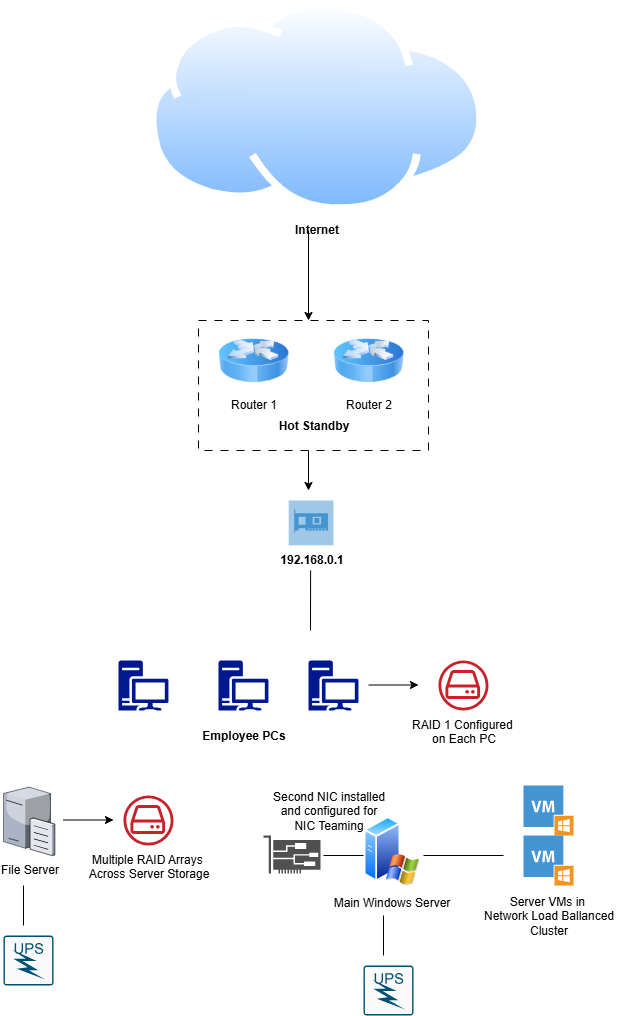
There are many basic fault tolerance methods you could implement in your small business network architecture. One of the classic methods of fault tolerance in a business environment is the use of Redundant Arrays of Inexpensive Disks (RAID). In basic terms, RAID uses multiple hard disks to share system data and provide fault tolerance, enhanced performance, or both. There are several different implementations of RAID that achieve different ends. They include:
- RAID-0: Also called Striping, this implementation uses two or more disks and splits the data across each of them. This enhances system performance but does not achieve any fault tolerance.
- RAID-1: Also called Mirroring, this implementation uses two disks and mirrors the data from one directly to the other, creating a clone. This way if the main drive fails, the secondary drive can take over.
- RAID-5: Also called Striping With Parity, this implementation requires at least three disks. First, RAID-5 provides the same striping functionality as RAID-0, with data distributed across multiple disks. In addition, each disk is assigned a parity bit, an extra bit of data that will help reconstruct the data in the event of a disk failure.
- RAID-6: Also called Block Level Striping With Double Distributed Parity, RAID-6 requires a minimum of four disks. It stripes data and stores parity information just like RAID-5, only here the parity information is stored across two disks. This allows systems using RAID-6 to tolerate the failure of two separate disks.
- RAID-10: Also referred to as RAID 1 + 0 or a Stripe of Mirrors, this implementation uses two or more mirrors using RAID-1, and then configures each mirror with a RAID-0 stripe. It requires a minimum of four disks but usually uses more. RAID-10 provides a high degree of fault tolerance, as multiple disks can all fail. As long as at least one disk per mirror stays online, the system can still function. However, more than one disk in any mirror cannot fail, as this will bring down the entire array.
RAID can be implemented in both software and hardware. Software RAID is configured on your operating system and is generally pretty simple to configure. Hardware RAID provides more benefits, such as Hot-Swapping drive functionality, allowing you to replace disks without powering down the system. Hardware RAIDs are generally more complex and expensive, but the benefits outweigh the cost if your goal is high availability for a system.
On the networking side, network technology providers like Cisco implement special protocols to enable fault tolerance. Cisco’s Hot Standby Routing Protocol (HSRP) involves configuring two or more routers in a group with a virtual IP address assigned to it. This allows the two routers to appear as one default gateway when in reality, one router is in an Active Mode while the other is in Standby Mode. Thus, if the main router fails, the standby router will take over. However, many small businesses do not employ a full-stack Cisco network, instead using a basic SOHO setup. In that case, fault tolerance can still be achieved by configuring an additional router with appropriate settings so that if the main SOHO router malfunctions, someone on premises can disconnect it and plug in the pre-configured backup router. Since basic SOHO routers are on the cheaper side, I highly recommend this approach. Going even further, you might want to keep hot spares of other central network devices like switches, access points, and Ethernet cables.
In all likelihood, the chances of a piece of hardware spontaneously failing are low. The most common scenario that mandates fault tolerance is a power outage. They are common in all areas of the world and can cause heavy inconvenience, not to mention potentially damaging hardware. This is why most enterprise networks implement Uninterruptible Power Supplies or UPS. A UPS is a device that serves as a backup power supply for computer hardware using battery backups. During normal activity, devices use the main building power while the batteries sit on standby. As soon as a power outage occurs, the UPS kicks in and the devices use battery power to continue activity. Keep in mind that UPSs are limited in their uptime; they can only provide power for the batteries’ lifespan, which will vary depending on the quality of the UPS. 15 minutes to an hour can usually be expected. It is also important to keep in mind that UPSs can be quite pricey, so small businesses should prioritize implementing them for their core devices and systems rather than every last computer. Routers, switches, and key servers should be the main priorities.
A hardcore fault tolerance mechanism is employing Dual ISPs. When you set up your business, you likely purchased Internet access from a local ISP and connected your modem and router to the demarcation point, not thinking about much else. However, if your business environment performs close to 100% of its work digitally, it may be worth toying with the idea of purchasing a second ISP for failover purposes. This method requires lots of planning and will likely be difficult to justify financially, which is why I recommend performing an exploratory analysis to get an idea of whether the cost of a second ISP justifies the benefits. In this approach, you pay for your primary ISP and subscribe to a secondary ISP that usually provides a slower or more basic connection. For example, you could have a high-speed fiber connection as your primary, and a basic DSL connection as the backup. Once the two ISPs are initialized, you can configure your router with failover between the two links.
Now we move onto the second main subcategory of high availability, Load Balancing. While fault tolerance mechanisms are concerned with providing backups to keep network operations intact, load balancing is concerned with performance and avoiding severe degradation of system resources. Let’s say that your business is a retail store with an e-commerce website for online shopping. During the holidays, your website is bombarded with traffic, and your local web server can’t handle the strain and crashes. Load balancing remedies this by combining multiple devices into a cluster and sharing traffic between them. The client sees them as one single server, when in reality, they are multiple copies of the same server working together to provide the end service. Load Balancing is most common in regard to servers. Cloud service platforms have baked in load-balancing functionality for their customers to use for their services. If you use a platform like Azure or AWS to host your company's servers, you should look deeper into load balancing functionality that you could implement. If you host your own on-premises servers, you can still implement load-balancing functionality as well. For example, Windows Server provides a built-in Network Load Balancing (NLB) feature that allows you to cluster multiple instances of Windows Server for better performance.
Another great high-availability feature provided by Windows Server is NIC Teaming. We are all used to the standard Ethernet network connection used by every system on a LAN. However, using NIC Teaming, you can install multiple Network Interface Cards (NICs) and configure them as one logical network interface, similar to the Hot Standby Routing Protocol. The NICs are load-balanced to provide more bandwidth to system services. The NICs also provide fault tolerance, as one NIC can be configured to take on the traffic if the other one goes offline. Therefore, NIC Teaming serves the double purpose of load balancing and failover, making it a good high availability mechanism cost-benefit wise.
It is understandable if High Availability features are not cost-justifiable for your small business budget. However, they should always be considered, and you should opt to implement redundancy wherever it is cheap. At the very least, I recommend that you keep hot spares of your router on hand, as well as several extra hard drives, network cables, and peripherals, in order to provide some form of redundancy to your systems.
External Links
- What is Server Failover?
- Redundant Internet Connections: Do You Really Need Two ISPs?
- Cisco Router HSRP Configuration – Two Examples
- High availability and scalability on AWS
- Best practices for achieving high availability with Azure virtual machines and managed disks
- Network Load Balancing
- NIC Teaming Overview