
Linux is a very powerful operating system that provides users with a highly customizable and secure experience. There is a common misconception that Linux systems are immune to cyber threats and thus do not need to be hardened with security controls. This is completely untrue. Linux makes up a much smaller percentage of the operating system market than Windows; hence, there are not as many pieces of malware out there targeting Linux systems. However, a determined threat actor can still compromise a Linux system, and users still need to follow common security best practices just as they would on Windows.
Linux systems are commonly implemented in business environments as server operating systems. Some businesses also use Linux as a desktop operating system for performing daily workflows. Regardless of how Linux is used in your environment, there are some basic hardening techniques to follow to enhance endpoint security. This documentation is focused on hardening Debian-based systems, as those are the distros most commonly used by new Linux users.
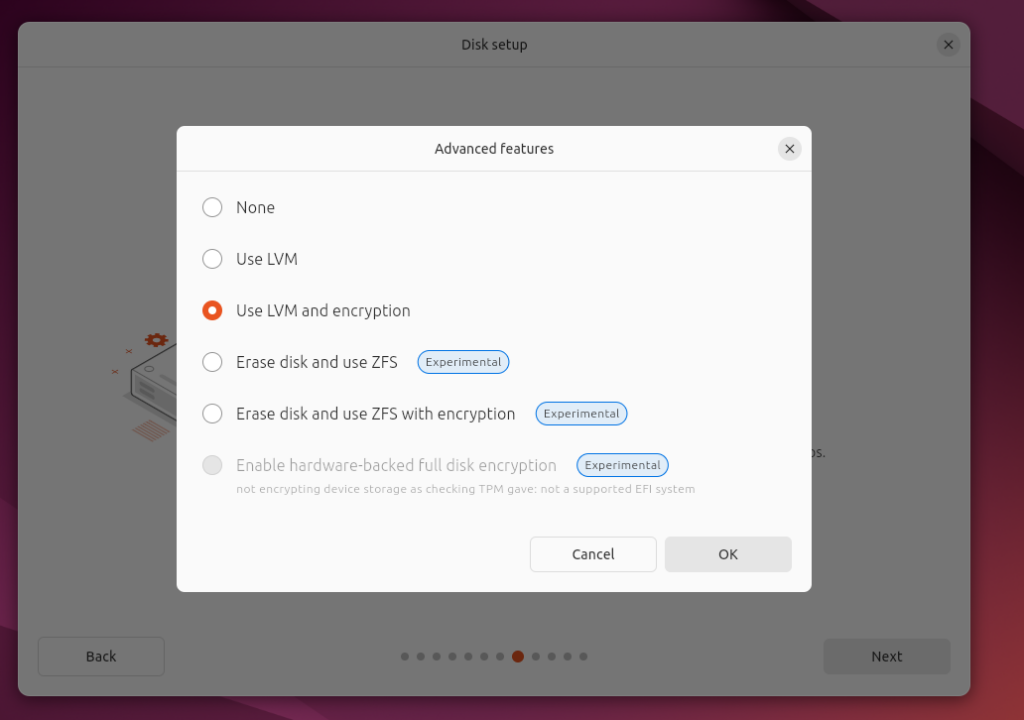
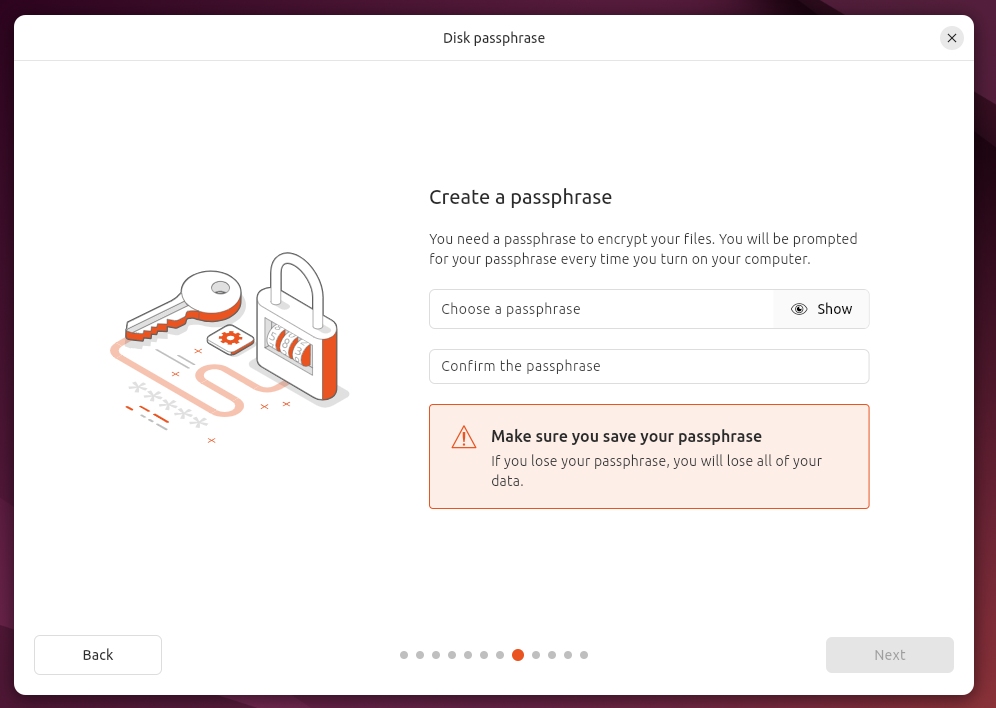
Enable full disk encryption. As stated in other pieces of framework documentation, full encryption of data at rest is a crucial part of cyberdefense. Linux allows you to encrypt your hard drive during the initial installation of the operating system. Make sure you take the time to turn on disk encryption by searching for an option along the lines of "Use Entire Disk & Set Up Encrypted LVM". You will need to set a passphrase which will be used to decrypt the disk during system startup. Ensure that the passphrase is properly stored in a secure location like a password manager.
Install a host firewall. Host firewalls are essential in a defense-in-depth strategy. They help protect endpoints against threats already present in the current network and protect data residing on the host operating system. The recommended host firewall for Linux systems is ufw.
sudo apt install -y ufw sudo ufw enable
Disable unnecessary services. Unlike Windows, Linux doesn't come with a lot of unnecessary services enabled. However you should do an audit of your system after installation to check for any unnecessary installed services. With system hardening, we want to reduce the attack surface of a host as much as possible.
        sudo systemctl list-units --type=service --state=running
        sudo systemctl disable <service-name>
        sudo systemctl stop <service-name>
Install and configure the auditd package for system audits. This package writes audit records to the disk, allowing administrators to review system activity.
sudo apt install -y auditd sudo systemctl enable auditd.service
Install and configure rkhunter. Rootkits are particularly nasty pieces of malware that can stay dormant inside systems for long periods of time without ever being detected. The rkhunter program can help monitor a Linux system for signs of well-known rootkits.
sudo apt install rkhunter
sudo rkhunter --updatesudo nano /etc/rkhunter.conf
Then set:
UPDATE_MIRRORS=1 MIRRORS_MODE=0 MAIL-ON-WARNING=your@emailSchedule regular scans via:
sudo crontab -e
0 1 * * * /usr/bin/rkhunter --check --cronjob --report-warnings-only
Install ClamAV. Many people will say Linux doesn’t need an antivirus, and for the most part that it is true. However it doesn’t hurt to install one. ClamAV is a popular Linux antivirus that you can install using the following methods:
sudo apt install clamav clamav-daemon -y sudo systemctl stop clamav-freshclam sudo freshclam sudo systemctl start clamav-freshclamRun a full system scan via:
sudo clamscan -r -i /
Or scan a specific directory:
sudo clamscan -r -i /directory_name
Install AIDE for file integrity monitoring. Endpoint systems need to pull their weight in upholding security within their operating systems. A piece of malware on a single endpoint could sprout into a worm that replicates throughout the network. An attacker could also attack a single endpoint belonging to an unsuspecting employee and walk out with an array of sensitive data. File Integrity Monitoring tools such as AIDE provide a layer of security by detecting unusual/unauthorized changes to files.
sudo apt install aide -y
sudo aideinit
sudo mv /var/lib/aide/aide.db.new /var/lib/aide/aide.db
sudo chmod 600 /var/lib/aide/aide.db
Run a check:
sudo aide --check
Schedule regular scans with email notification:
sudo apt install mailutils
sudo crontab -e
30 2 * * * /usr/bin/aide --check | mail -s "AIDE Check Result" root
Turn on automatic updates. Linux is known for having a less intrusive patching process than Windows. You can make this process even smoother by enabling automatic updates.
       sudo apt install unattended-upgrades
       sudo dpkg-reconfigure --priority=low unattended-upgrades