
In just the past decade, the use of cloud platforms to host business resources has skyrocketed. In many ways, embracing cloud computing makes perfect sense for business owners. For a certain fee, they can offload much of the responsibility for managing technology to a third party, putting less strain on their budget and technical resources. Paying for a third party to host an SQL database server is often much more practical than configuring an on-site server, sense the business no longer must worry about ensuring things like high availability and backend security.
The official NIST definition of cloud computing is: “Cloud Computing is a model for enabling ubiquitous, convenient, on-demand network access to a shared pool of configurable computing resources (e.g., networks, servers, storage, applications, and services) that can be rapidly provisioned and released with minimal management effort or service provider interaction.”
If you are a small business owner in 2025, then it is more than likely that you are already using cloud platforms in your environment. However, it is important to properly define what types of cloud computing you are utilizing. If you do not currently use any cloud platforms but are looking to migrate to one, then it is important for you to understand the technology so you can narrow down your requirements and desires and pick the best option.
First, be aware that not all clouds are created equally. There are several different cloud computing models with different levels of access and control by the end users. They are:
- Private Cloud: This model is used to host your business’s resources are your business’s only.
- Community Cloud: This model is used by both your business and businesses like yours, allowing organizations with similar goals and needs to share resources.
- Public Cloud: This is the most popular cloud model and is what most people think of when they think of cloud computing. A public cloud is available to anybody who is willing to pay. Its resources are shared by thousands of organizations across the globe.
- Hybrid Cloud: This model is a combination of any of the above models. For example, an organization may use a public cloud provider to host its company apps on the Internet but may then use a private cloud to host its sensitive databases and file servers.
At its core, cloud computing is a technology that provides customers with access to scalable, highly available technical infrastructure via the Internet. A Service Level Agreement (SLA) is made between the cloud vendor and the customers as to who manages what. This depends on what kind of cloud model the customer is looking to purchase. The resulting delegation of responsibility between the vendor and the customer is known as the shared responsibility model.
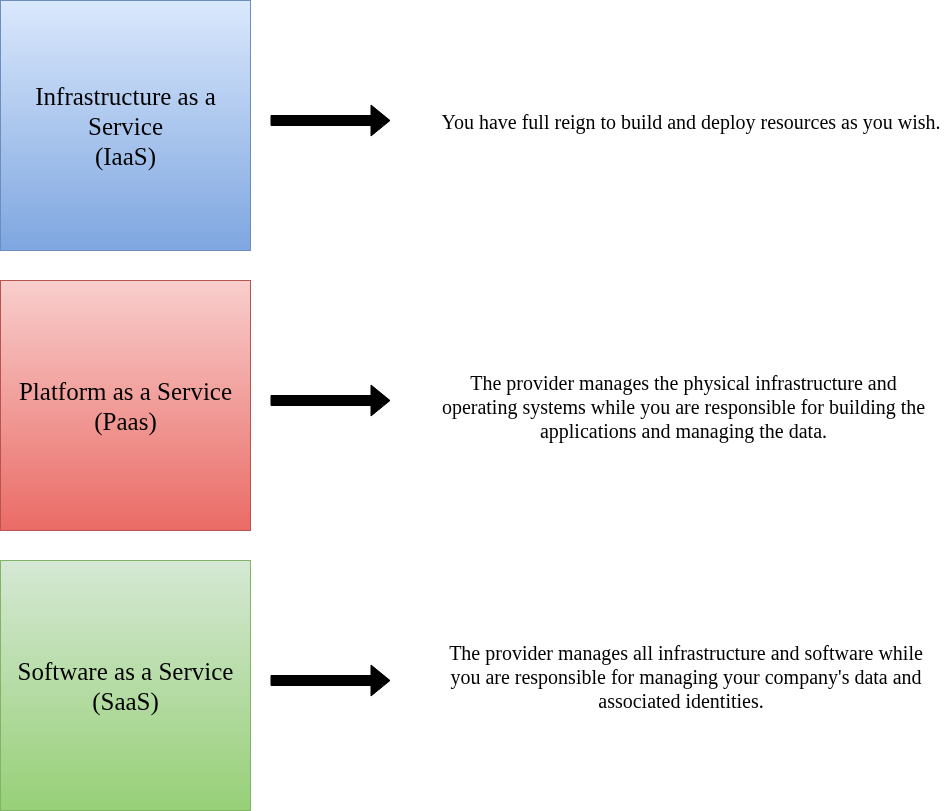
There are three main cloud responsibility models with differing separation of vendor and customer responsibility. They are:
- Infrastructure as a Service (IaaS): The vendor provides various pieces of technology on demand, such as servers, storage devices, and networking devices. The customer is left to configure and maintain the virtual resources themselves. (Ex: AWS S3, which allows a business to provision storage for their data on Amazon’s own hardware rather than on local drives).
- Platform as a Service (PaaS): The vendor provides virtual hardware, operating systems, and some tools to the customer, who is left to develop and manage their own applications on said resources. (Ex: Azure App Service and Functions, which allow businesses to build and host apps and serverless processes in a Microsoft hosted environment).
- Software as a Service (SaaS): The vendor provides everything from backend hardware to finished applications, while the customer is tasked with managing their own data and identities on the software applications provided. (Ex: Google Workspace providing a business with cloud hosted productivity tools like Google Docs and Sheets, QuickBooks providing a business with accounting software residing in cloud storage rather than on the business’s local computers).
With these definitions given, you likely already have an idea on what cloud models your organization uses or wishes to use. Regardless of the model, there are some key aspects promised by all cloud platforms for all their models:
Scalability/Rapid Elasticity: Customers can add and remove resources from their cloud technologies as they wish. This allows them to easily adjust their resources to shifts in demand from their own customers. Think of this concept as holding a rubber band around your hand and using your fingers to expand it to different sizes. This is essentially what cloud computing platforms allow you to do. Below are the common scalability strategies offered in the cloud:
- Horizontal Scaling: increasing the number of machines used in a system to better handle a workload through load balancing.
- Vertical Scaling: increasing the power of resources given to a single server to better handle the increasing workload. This may be done by increasing the number of CPU cores on a server or adding more RAM.
- Autoscaling: the cloud platform dynamically increases or decreases the resources in a group of servers depending on the intensity of the workload. This is usually done through horizontal scaling by implementing a collection of dedicated servers known as a server farm. Servers are brought on and offline depending on the amount of traffic being directed at the resources at the time.
High Availability: when you sign an SLA with a cloud provider, they are agreeing to guarantee a certain amount of uptime for your resources. Even the biggest tech companies have blackout periods or maintenance windows, so some downtime is expected. Most cloud vendors will agree to provide their customers with something like 99.99% uptime. Often included in the SLA is the option to file a report with the cloud vendor if the customer does not receive the promised uptime, usually resulting in an account credit or other reimbursement. To keep their promises of high availability, cloud vendors will employ strategies such as redundancy, failover clustering, and geo-replication.
Reliability: Cloud vendors will pride themselves on having some of the best technology out there to host their services. They will usually promise their customers strong technological resilience and the capability to recover very quickly from failures. Cloud platforms often have great fault tolerance technologies and consistent data replication mechanisms. Even in the event of a crisis or blackout period, reliability can still be guaranteed by changing the region or zone hosting the customer’s services as soon as some sort of error occurs.
Performance: another key promise of most cloud vendors is the great performance of all end resources hosted on their servers. Again, this can depend on the resources you as the customer provision for your services (you aren’t going to get great performance out of a database server with 2GB of RAM), but still customers can often expect better performance from vendor hardware than their own.
One thing to always keep in mind when purchasing a third-party cloud platform is that you are no longer hosting the hardware used for your services. To many customers this is a positive, since they no longer must worry about power hungry computers running up their office’s electrical bill. However, it can be a downside to some, as they may be uncomfortable with not having full control of the machines hosting their critical workplace services. As a business owner, it is very important that you weigh the pros and cons of migrating to the cloud before you even think about purchasing any resources from a provider.
It is also important to remember that even if you outsource as much responsibility as possible to a cloud provider, you still have basic technical responsibilities on your end. Not only do you need to uphold your part of the SLA, but you need to ensure basic network connectivity in your facilities so that you and your employees can actually access the resources you purchase.
To keep up with their promise of high availability and reliability, cloud providers utilize a series of network deployment methods to provide the smoothest experience possible. These include:
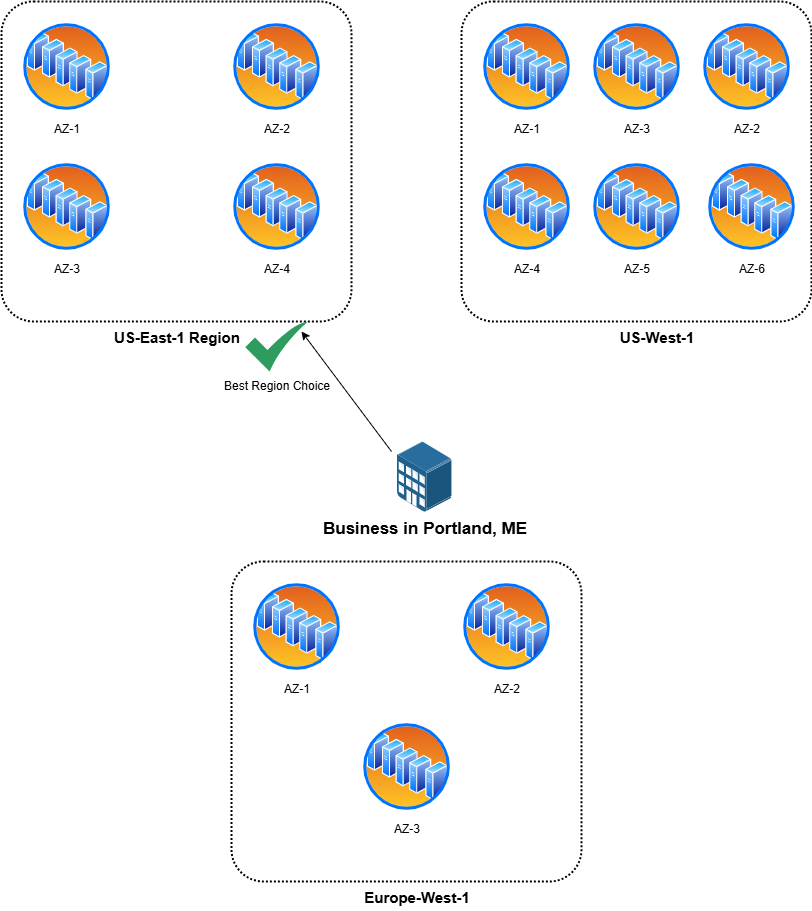
Regions: a cluster of the provider’s datacenters in a specific geographical region in the world. Oftentimes these regions have straightforward titles such as “US-East-1” or “Europe-West-2”. When setting up your cloud subscription, selecting the closest region to your location is often one of the first things you are asked to do.
Availability Zones: an AZ is a single datacenter or group of datacenters within a region. AZs are independent of reach other, with the aim of providing redundancy in the event of a failure on another AZ in the Region. If you want to simplify it, think of an AZ as an even more specific region within a larger region. For example, the region “US-Southeast-3” may have 4 total AZs inside it.
Content Delivery Network (CDN): To keep with their promise of high performance, cloud providers will often use various technologies to speed up customer access as much as possible. A CDN is another collection of servers that work together to speed up access to webpages and resource intensive processes/servers. The servers in a CDN are essentially proxy servers, meaning they are devices that cache website contents locally. Therefore, when a cloud customer goes to access a cloud hosted resource, the CDN delivers the content from its cache rather than making the customer’s network jump across the world to directly pull down the content.
Now that you are more familiar with the physical and logical components of cloud computing, you should get an idea of what you desire from a cloud vendor and what choices to make when purchasing. Keep in mind that you still hold a degree of responsibility for your business resources even when most of the hosting is done by a vendor. Therefore, it is important to use proper project management and communication techniques to ensure that cloud migrations go smoothly for your business.