In a previous piece of framework documentation, I produced Workgroups and Active Directory Domains as two standard solutions for managing endpoint devices in a business environment. These have been the classic solutions for decades now and will still work well for many organizations. However, issues with security governance and management have arisen from the widespread embrace of mobile devices in work environments. Enterprise mobile devices, such as laptops and surface tablets, have many upsides for businesses, such as decreased costs and better functionality for businesses with travel and/or remote work requirements.
However, since mobile devices can be moved outside the business facility and used on a variety of unknown networks, the stability of an in-place workgroup or domain is lost. Desktop computers are not meant to leave the office, so they are always available for roll call on the workgroup or domain. Mobile devices are frequently disconnected from the workgroup or domain, meaning the on-site control the business has over the device is removed. Domain-connected devices can be configured to cache a certain number of domain logins, allowing users to continue to log into the device when outside the office for a certain time. However, the ability to log in is lost after the caches expire, and there is no way for the local network servers to continue to control the mobile device unless something like a VPN is used.
Mobile Device Management (MDM) has arisen as a way for organizations to continue asserting control over mobile devices even when they leave the office. MDM is a service provided to businesses via cloud platforms and is essentially a domain, but with more flexibility. Mobile devices are enrolled in the business MDM platform and attached to the primary user’s digital identity, which has been connected to the MDM platform. A common example of this is Microsoft Entra ID combined with Microsoft Intune, both being cloud services under the same Microsoft umbrella. Employee identities are configured in Entra ID and are usually used for a variety of business services like email and Software as a Service (SaaS) applications. Intune is Microsoft’s MDM offering, and it allows the administrators of the Entra ID domain to create profiles for company devices. These profiles can be configured with extremely granular settings and configurations in the same way as Group Policy on local domains. Once company devices are enrolled under an Intune profile, employees sign in with their Entra ID accounts to access the operating system. Since MDM platforms are cloud-based, devices can connect and provide organization-controlled functionality regardless of the network being used.
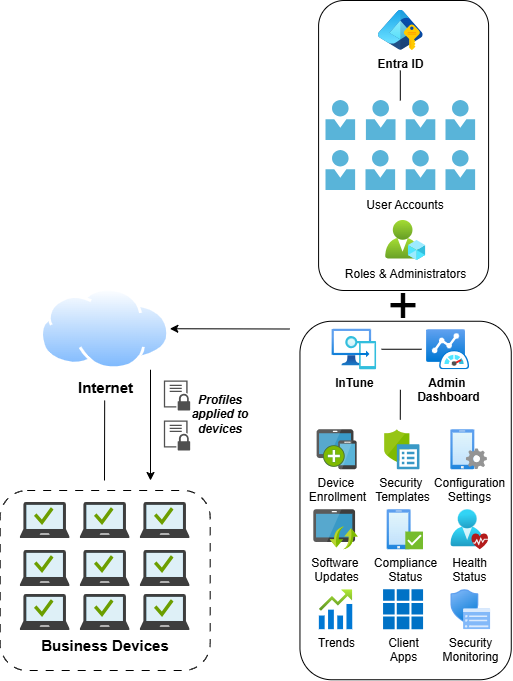
There are multiple other MDM platforms besides Intune, each one leaning towards a specific device vendor. JAMF is an MDM platform for Apple devices, including macOS, IOS, and iPadOS. If a business has an Apple-centric environment, then it will probably want to use JAMF. Apple Configurator is a more basic Apple device configuration software, allowing MDM profiles to be created and pushed out to devices on which employees can log in with their company AppleIDs. Some MDM solutions have increased convenience stemming from cross-platform support. For example, InTune allows businesses to enroll not just Windows devices, but also Android, IOS, iPadOS, and Ubuntu Linux. This makes it an attractive option for businesses with a mix of different operating systems in their environments.
Businesses do not have to fully embrace a strictly MDM environment either. Microsoft offers a hybrid infrastructure solution where on-premises Active Directory domains can be combined with Entra ID. Identities are federated between the two platforms, allowing employees to log in with a single set of credentials on both solutions, making it appear to them as if they are using a single platform. This is an attractive solution for businesses that want to keep their on-premises infrastructure while also allowing for increased device mobility.
Implementing an MDM solution requires proper preparation, as it can be a complex piece of technology to implement in businesses without a significant cloud presence. A risk assessment and cost-benefit analysis should be conducted to determine the viability of MDM. If a business does decide to embrace MDM, it must ensure that it is properly implemented, either by skilled IT staff or a third party IT consultant if necessary.