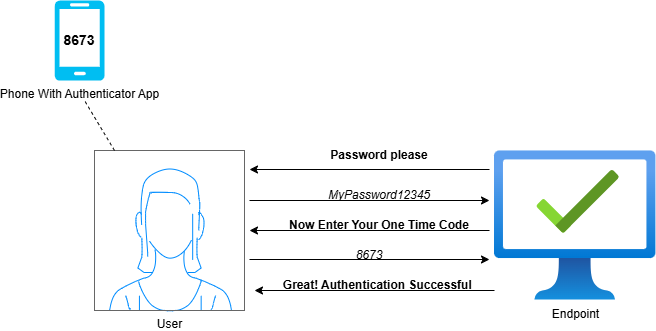
In today’s digital world, using simple usernames and passwords for authentication is no longer enough for optimal security. Threat actors are enhancing their social engineering techniques for extracting passwords from users, and emerging technologies like quantum computing have the potential to crack even the most complex of passwords.
Multifactor Authentication (MFA) is recommended for every user online today as an approach to combat these new threats. MFA requires users to provide a second unique factor, in addition to their username and password, when authenticating. This secondary factor should be more complex and something that only the users themselves possess.
Authentication factors are broken down into several categories:
Something You Know: This is your typical username and password combo
Something You Have: This could be a unique passcode or a cryptographic key that the user possesses.
Something You Are: This takes the form of biometrics, like retina scans, fingerprints, or facial recognition
Something You Do: This method requires users to perform a unique action, like walking through a scanner to provide their unique gait.
Most online services today provide options for MFA. Centralized Identity & Access Management platforms also provide MFA options for use across a variety of organizational resources.
Ensure that your organization implements MFA wherever it's available. The complexity of the authentication factors varies. You and your cybersecurity team should carefully consider the viability of each option for MFA.
Authenticator Apps: Mobile apps such as Duo Mobile and Microsoft Authenticator allow users to connect various websites and services to the app. When a user initiates authentication to these resources, they are required to open the authenticator app and either retrieve a unique One-Time Passcode (OTP) or approve a Push Notification. Once the requested task has been completed, the resource validates it with the Authenticator App and grants user access if the key is correct.
Hardware Tokens: Some users may prefer having a dedicated device to produce a One-Time Passcode rather than a digital app. Users can purchase small hardware tokens that generate an OTP for the user, usually when a button is pushed.
SMS: Codes for authentication can also be retrieved via SMS notifications. This is a common method on most mainstream websites that require you to create a user account with them. During authentication, the user selects the option to have a code sent to their phone number. Once the code has been retrieved, the user has a set timeframe in which the code is valid for entry on the destination resource.
Biometrics: Biometrics are popular for authentication as they are quite complex and difficult to fabricate. Many mainstream devices and services offer and recommend biometric authentication. Probably the most popular biometric authentication method is the fingerprint scan, where users press their finger against their device for validation. Retina scans and facial recognition are also popular methods. Users are required to perform the initial setup of their chosen biometric method, where the device/service scans for a baseline copy. On each subsequent authentication attempt, the provided biometrics are validated against the baseline copy.
Smart Cards: This authentication factor takes the form of a physical card that contains an embedded cryptographic key. Each user’s key is unique to them and only them. During authentication, digital resources require the user to insert their card into a smart card reader, where the cryptographic key is validated. If the card contains the proper key, the user is allowed access.
It is crucial to meet with your cybersecurity team to decide on the best approach to implementing MFA in your organization. Some MFA solutions may be built into resources you already own. Others require subscriptions to dedicated services and/or the purchasing of devices. You must select an MFA solution that fits within your organization’s financial and technical constraints.
Once an MFA solution has been purchased, tested, and deployed, it must be regularly monitored to ensure continuing functionality. Many MFA solutions can be managed through a central dashboard by a technical admin. Other solutions leave most of the control with the users. Whatever deployment you end up choosing for your organization, ensure that it is well-maintained and that employees are responsible with their authentication factors.