
For security to be applied effectively in your business, you need to have at least a surface-level understanding of how your networks function and how data flows into and out of them. The majority of people are not information technology experts. They simply buy the necessary equipment and follow the manufacturer's instructions to get everything up and running. As a business owner, you are ultimately responsible for any breach of the CIA Triad inside your network. Thus, you must take the time to understand and outline the basic design and functionality of your network infrastructure.
Network Maps are diagrams that lay out the design of a network in a visualized format, much like building blueprints. Network maps can range from basic sketches to very detailed drawings done with computer software. Before you can begin creating maps of your network, you need to understand network topologies. According to Cisco, the topology of a network is used to describe the physical and logical structure of a network, mapping the way different nodes on a network--including switches and routers--are placed and interconnected, as well as how data flows. There are a few different kinds of network topology.
Point-to-Point: This is the most basic network topology and is the foundation of the client-server concept. There are two nodes that are connected and can both send and receive data.

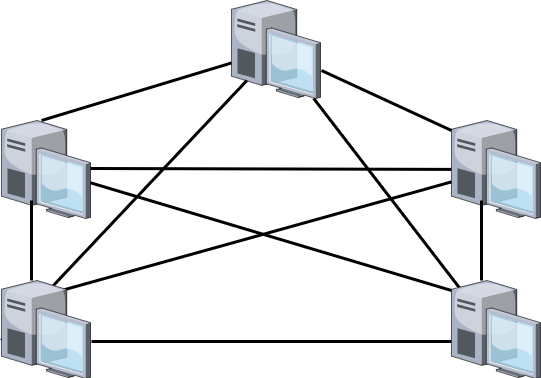
Mesh: Many different nodes are connected via dedicated links. There are no intermediaries needed to forward data to one node on behalf of another; instead, every node has a direct line to every other node in the network.
Star: This is the backbone of a local area network (LAN). Instead of having a direct connection to each neighboring node, every node has one line into a central hub that has the ability to process and forward data to other nodes on the same network. The nodes have no direct link to each other, but the central hub knows how to help them reach one another.

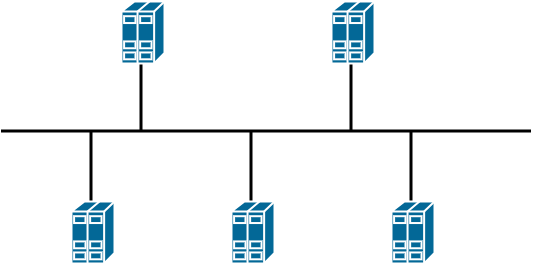
Bus: In a bus, multiple nodes are connected to a single cable. The single cable link is hooked into by each node via droplines. If the backbone cable goes down, communication is lost.
Ring: A ring is made up of multiple nodes that are directly connected to the previous node and the next node in the topology. Therefore, every member of the network will have exactly two neighbors. The ring keeps expanding for however many devices are present. However, this means that if node 1 wants to send traffic to node 15, the traffic will have to pass through 14 other nodes to reach the destination.

Tree: This is a more complex version of the Star. There is still a central hub that controls the flow of traffic; that functionality is also delegated to a lower hierarchy of nodes that serve as central hubs for their own smaller star. You often see this in enterprise networks that utilize one core switch and a number of distribution or leaf switches.

Hybrid: This is a combination of any of the previous topologies. Most organizations are made up of some sort of hybrid network topology. For example, the Internet Service Provider (ISP) is connected with other ISPs in a Mesh topology. Within an ISP, there may be a large organization with multiple campuses that are joined in a Ring topology. Then each individual campus is comprised of multiple LANs organized in a Tree topology, which in itself is a combination of multiple Star topologies.
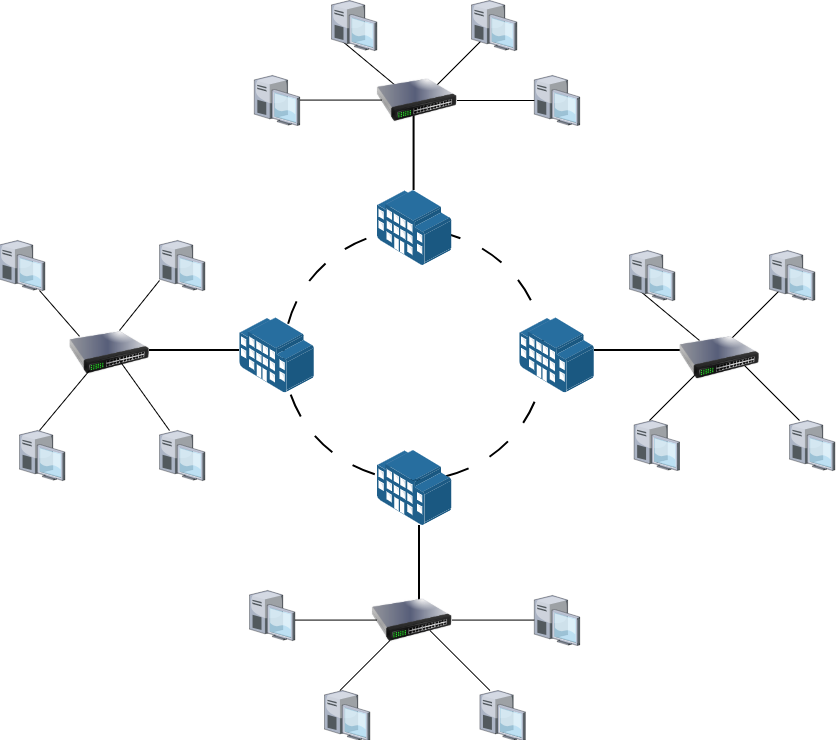
A small to medium-sized business generally deals with one or several Star topologies. Only if your network comprises multiple campuses connected over a Wide Area Network (WAN) will you be dealing with large Rings or Mesh topologies. A basic enterprise network setup consists of a router, which connects to a core switch, which then connects to multiple other switches where different network segments are configured.
Now that you understand the topologies, you can begin thinking about how you would sketch your business network out in a drawing. There are two types of network maps:
- Logical: This format deals with the underlying network topology of your network. It clearly shows which nodes are connected to which other nodes, and how data could flow between them. This could be as simple as using shapes to label different network devices (square for switch, circle for router, triangle for endpoints). The logical map also includes the IP addressing scheme for the network, showing how the larger network is broken down into a hierarchy of subnets and segments. More advanced logical maps also label the exact network interfaces that partake in the network (FastEthernet0/1, GigabitEthernet1/1, etc). To speed up this process, you can look into a number of different software programs available that automate network discovery and mapping.
- Physical: Many enterprise networks are shabbily put together. Poor cable management and a general lack of knowledge on where network devices are located will develop over time without proper oversight. A physical network map will allow you to keep an organized view of the physical architecture of your network. A physical map is not worried about the specific logical connections of your network; it overlays the locations of network infrastructure onto a basic floor plan of your business facilities. Server rooms, racks, networking devices, cable flows, and direct connections must all be included in a physical network map.
You must create both a logical and physical network map of your network infrastructure before proceeding with this framework. Having them on hand will make implementing controls and improvements easier, since you will no longer be guessing as to where cables run to or where devices sit on the network. These maps do not have to be perfect, but they should include the necessary information as described in the previous descriptions. Once the logical and physical maps have been created, they must be properly stored and secured along with other important internal business data. Maps should be updated whenever any changes to the physical or logical network topologies are made. Ensure that copies of previous maps are retained through a version control procedure.