
A cybersecurity term that is familiar to pretty much everyone who uses technology is the password. Since the dawn of information systems, passwords have been the default method for authenticating users to systems. The username and password combo is still the most common means of authentication used for business systems. A user simply creates a memorable string of characters and provides it to a system during enrollment. From then on, the user will enter that same string of characters whenever asked by the system.
Since passwords have been in use for so long, attackers have devised numerous schemes to compromise them and exploit them for nefarious purposes. To combat this, individuals have been encouraged to create increasingly stronger passwords. What constitutes a “strong password” can be very confusing to users. This is why small businesses need to draft a password policy that clearly explains the minimum requirements for employee passwords. Simply distributing the policy is not enough; businesses also need to import the policy into their information systems to enforce the minimum requirements.
As of the mid-2020s, there are a few different recommendations for password requirements that are passed around. For your average small business, the following requirements generally suffice:
- Minimum password length of 12 to 15 characters. This can be a risky requirement since the length can make the passwords difficult to remember. Employees may then be enticed to violate security standards by writing passwords down on sticky notes and attaching them to their monitors. To avert this, encourage users to create passwords modeled on very unique and memorable phrases with special characters and numbers substituted for certain letters. For example, I may be a big Gulf War history buff and create a password like Brooke$hieldsDesert$torm1991. That is very memorable to me, and once I remember to substitute uppercase S’s with $’s, the password will pretty much become second nature.
- Enable Password Complexity. Many people used to believe that hardcore complexity was the way to go, something like 67*54shahd#@ as a password. But reality has taken hold, and many administrators have realized that these kinds of passwords are near impossible for your average user to remember. This can lead to an increase in users writing down passwords on paper, as well as an increase in help desk calls regarding forgotten passwords. You should still enable password complexity for your business systems, but rather than focusing on hardcore complexity, instead focus on encouraging users to substitute letters with characters that are easily remembered. For example, have users replace some Os with 0s, As with @s, and Ss with $s.
- Set a maximum password age of 60 to 90 days. It is up to you and your IT staff to decide the total number of days before expiration. However, you should always shoot for at least a 90-day minimum. It would be nice to be able to use the same password every day forever. However, as time passes, chances for password compromise grow. Rotating user passwords on a regular schedule is a good precaution to keep security fresh.
- Enforce password history. The previous requirement is mute without actually forcing users to make a unique password on every refresh. Without password history enforced, employees can simply change their password on schedule, then call the help desk for another reset and change the password back to their original. Enforcing a password history of at least 20 passwords ensures that no prior passwords can be used for future changes.
- Enforce a minimum password age of at least 15 days. This is another requirement that will help make unique passwords mandatory and prevent excessive changes by users. By setting a minimum password age of 15 days or more, you can require your employees to stick with a new password for a while before changing it.
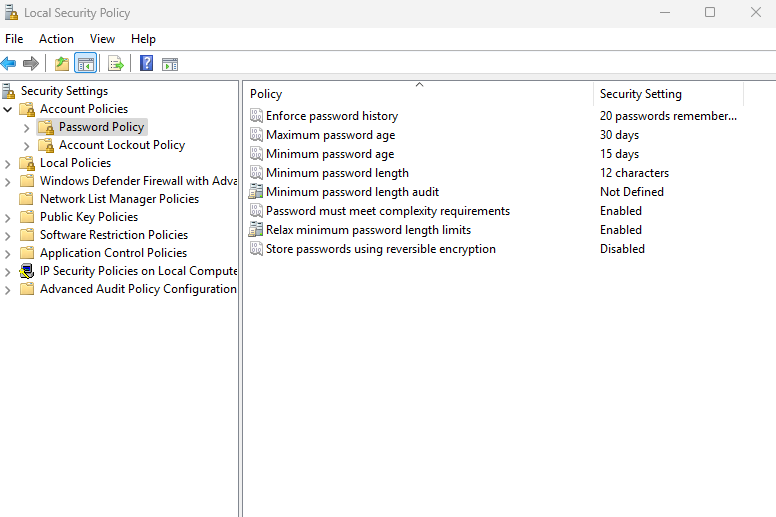
The requirements above are a generally acceptable secure business password policy. Recently, however, NIST came out with a new standard for password policies that completely challenged all the previously accepted password standards. The NIST revisions made the following major changes:
- Do not require password changes unless an account is believed to be compromised. This will largely eliminate the vulnerabilities created by users writing down new passwords to remember them.
- Enforce Multifactor Authentication (MFA) for all accounts. Organizations should focus on using MFA to enhance security rather than complex passwords.
- Set a minimum password length of 8 characters without any other complexity requirements. This may be a head scratcher, but the idea is that organizations should focus on ease of user over complexity.
- Use password filtering to block the use of insecure passwords. This feature is very common in mainstream Identity & Access Management platforms. Things like:
- No passwords that have been found in mainstream password dumps and breaches.
- No passwords that use only dictionary words.
- No passwords made of repetitive or sequential characters like abcdefg123456.
- No passwords that contain direct references or clues to the user’s identity.
There is also an increasingly popular trend of using passphrases as a means of implementing strong passwords. A passphrase is an easily remembered phrase that serves as a mnemonic for complex passwords. For example, I could set a complex password of 0IHvtHke. This is complex to remember, but I could create a passphrase of “Only I Have the House key”. By remembering this phrase, I can keep track of the first letters of each word and use them to remember the specifics of the complex password.
At the end of the day, it is really up to you as a business owner to decide what direction you want to go with your Password Policy. If you use a simple Workgroup or Domain network with little use of identities in the cloud or on the Internet, you might want to pick the first set of requirements recommended in this documentation. There is a push towards replacing passwords with Passwordless Authentication mechanisms like biometrics and passkeys. It is also pretty much a requirement to use Multifactor Authentication on all accounts, with the strength of the second authentication factor being emphasized more than the initial password. If you decide to start using smart card authentication in an MFA program, you might want to implement the new NIST recommendations for passwords. Before finalizing your Password Policy, discuss all of these points of view with your Steering Committee and get input from individual employees to decide on the most comfortable track.
Example Policy
 Loading...

 Reload document
  Open in new tab