
Every since the onset of the COVID-19 Pandemic, remote working has become a standard part of normal operations for many organizations. This may include employees working fully remote jobs or hybrid ones. If your business requires a lot of travel, you will also have to engage with remote working on a regular basis. No matter the pretext, you should set down some ground rules for remote operations in your organization.
Whether or not you want to allow employees to use personally owned devices to access company resources should have already been decided in a Bring Your Own Device (BYOD) policy. This section ties in very closely with the BYOD policy.
Whether or not you want to allow personal employee devices for remote work, you need to provision employee devices with the proper tools for them to do their job. For company owned devices, this may be as simple as putting a clean OS image on a device and installing necessary software. If an employee is using a personal device and/or working a long distance from your facilities, you could share installation files over a cloud storage platform like OneDrive or Dropbox.
If your organization employs a large amount of remote users, you should look into implementing a Mobile Device Management (MDM) solution. This will allow devices and user accounts to be provisioned and controlled from a centralized platform. Microsoft Intune is a recommended MDM solution. It supports various operating systems and granular user and device controls. Intune includes a Company Portal where company Apps can be pushed out for user download.
It is up to you what solution you choose to provision and manage remote devices. However allowing employees to use personal devices that have no oversight presents a serious security risk and is a serious violation of Zero Trust principles. An employee could be using an outdated operating system or a device with unpatched security vulnerabilities and no anti-malware software. If they are accessing internal resources, company data will likely become compromised through the insecure machine.
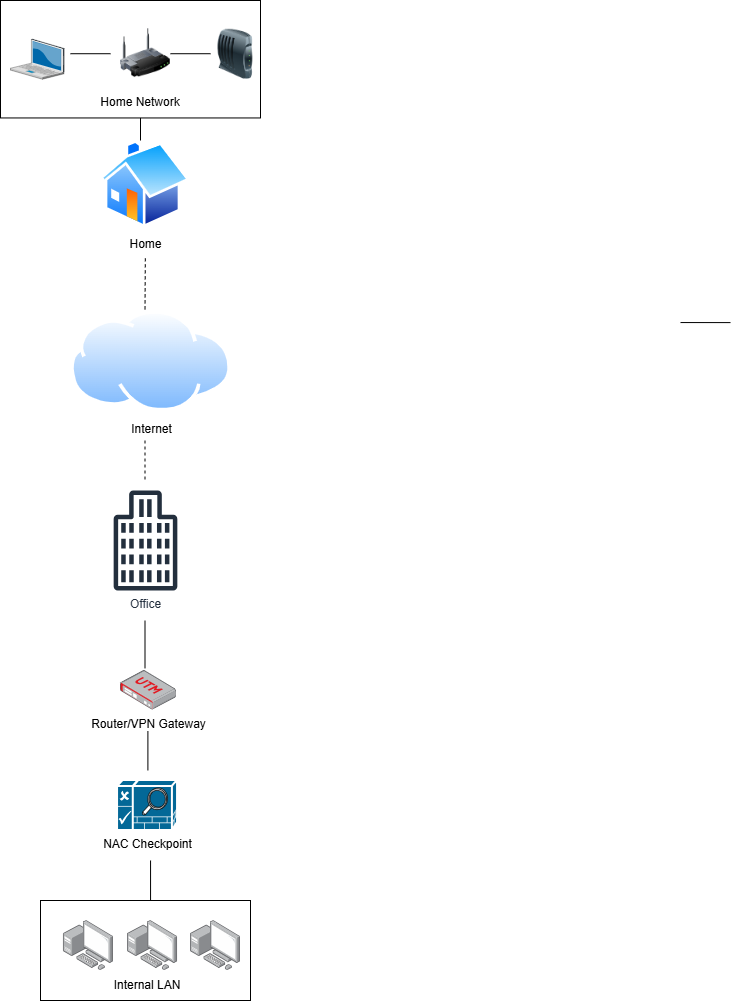
If you want to allow employees to use personal devices securely, you should implement a Network Access Control (NAC) solution. NAC sets compliance standards for any device attempting to access internal resources. Prerequisites for being granted access may include having a minimum operating system version, having antimalware software present, having a host firewall present, and even undergoing a malware scan. If the device fails to meet these pre-requisites, access to resources is denied until issues are remedied. Potential NAC solutions include EasyNAC,
Remote work guidelines should also address what networks are being accessed. Your organization has no control over the state of remote user's personal Wi-Fi security. If roles involve frequent travel, employees will likely need to connect to hotel, airport, and Internet cafe networks. These networks are notoriously insecure and pose the risk of intruders compromising remote devices and being able to access your company data.
An organization will need to implement a Virtual Private Network (VPN) solution to mitigate this risk. Think of a VPN as a mask that shields activity on a dangerous network by encrypting and tunneling the traffic back to your secure company network. VPNs come in different suits and can be complicated to implement.
OpenVPN is a reputable VPN solution that may be more accessible for small businesses. It is recommended that you discuss solutions with your cybersecurity team and any financial advisors before choosing a solution.
It is up to you to decide what remote work implementations fit your business environment. You may opt for Mobile Device Management, Network Access Control, VPN, or most likely some combination of the three.
Example Policy
 Loading...

 Reload document
  Open in new tab