
In the year 2025, having social media is an essential part of engagement for small business owners. Social media is a powerful tool for creating a brand image, maintaining good community relationships, and even enabling features for automated scheduling and messaging with customers. Since social media pages have this much power, having them compromised would be especially embarrassing. Social media accounts should be given the same security measures as other web-based business platforms.
A good starting point is to treat a dedicated email address for social media-related tasks. Attaching the logins for company social media pages to a particular user's email gives the user root-level control of those pages. This is a bad security practice that has the potential to cause trouble in the case of a disgruntled employee threat. Instead, create an email address like socials@mydomain.org, or outreach@mydomain.org. You can then forward the mailbox from the chosen email address to the personal email addresses of the staff members managing the social media pages.
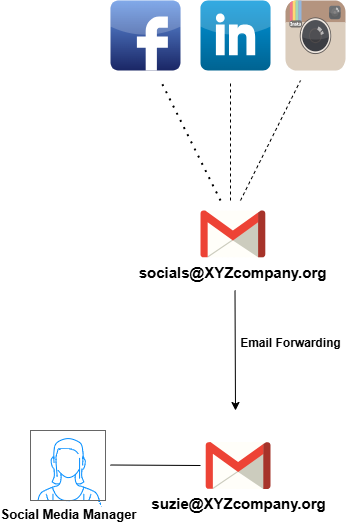
Application-level security controls vary according to the social media platform in use, but the same basic ideas usually apply universally. Secure authentication, recovery methods, and MFA are at the forefront. Below are some particular controls for various popular business social media platforms.
- Use a strong password in compliance with your established Password Policy.
- Opt for a Passkey for extra security.
- Turn on MFA.
- Use a designated device for managing social media pages and trust no further devices.
- Enable Login Alerts.
- Use a strong password for accounts.
- Turn on MFA.
- Attach a phone number to use for validation.
- Turn off the "discover by phone" feature if a number is added.
- Keep internal data separated from social media by disabling contact syncing.
- Keep the list of services attached to your profile limited to the bare minimum.
- Turn off private data sharing.
- Limit data collection in general.