
A good first step to take after completing a risk assessment and gap analysis is to determine technology upgrade needs for your business. Many small businesses fall into the trap of hanging on to technology even when it's past industry standards. You would be surprised how many people are still using Windows XP or 7 ready workstations in 2025. You cannot have a quality cybersecurity program with outdated technology, as that technology is an inherent vulnerability.
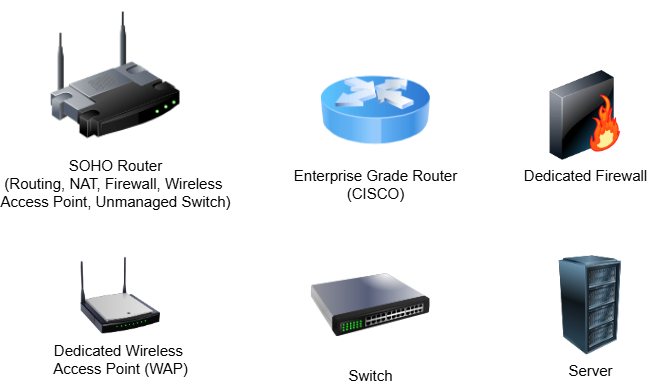
Start by defining your network technology needs and determining any areas for upgrades. Many small businesses use consumer-grade Small Home and Office (SOHO) Routers. These are the routers that you can pick up at your local electronics retailer. A SOHO router is actually a unified network device consisting of a router, NAT appliance, firewall, wireless access point, and an unmanaged switch. These devices are affordable and can support a business with an average of 12 to 20 active connections. A larger network that needs to support more connections will typically implement higher-powered devices that have dedicated hardware for each service, for example, a dedicated router, a dedicated firewall, and a series of dedicated access points.
If your organization resides in a large facility, it is possible that the wireless signal from a single SOHO router will not be sufficient to cover the entire premises. If you need more wired connections that span a large area, you will likely need to look into buying more dedicated switches and cables. In both of these cases, you should consult with your cybersecurity team and financial advisors to determine the best option for purchasing upgrades.
Having a stable network backbone is only part of the equation. You also need to ensure that your employees are using stable workstations and servers. Earlier in this stage, you conducted a hardware asset inventory. At this point, you should review the inventory and determine whether the current devices are sufficient. Combine your assessment with input from the employees who use the devices to get a nuanced view of their performance. Determining the hardware standards for your workplace devices also depends on the specific types of work you are doing. If you do a lot of design work, you may want to emphasize a large amount of RAM and a high-powered graphics card. If you work with a large amount of locally stored data, you might instead opt for a large storage device that can provide fast read and write operations.
Regardless of what specifications you opt for, there are some bare minimums you should select, regardless of how the device is used.
- 8GB DDR4 RAM
- 512GB storage device, preferably SSD
- Intel Core i7, AMD Ryzen 5, or newer processor
- Integrated GPU. If you run graphically intensive applications, it is highly recommended to look into purchasing a dedicated GPU
- Gigabit Ethernet card and/or Wi-Fi 6 capability
- USB ports, preferably at least one USB-3 and one USB-C
- An HDMI or DisplayPort
- 1080p display
- UEFI with Secure Boot and TPM 2.0
A major issue many small businesses with limited technology budgets are facing involves migration to Windows 11. As of October 2025, Windows 10 is no longer supported by Microsoft, meaning it no longer gets security updates and thus should never be used in any business environment. If your environment is Windows-dominated, you MUST be using Windows 11 as of 2025. Windows 11 requires more specific system components than previous Windows versions. Specifically, it requires a minimum of 4GB of RAM, UEFI, Secure Boot, and a TPM. These are fairly modern specs, meaning that older machines may not be compatible with the OS. Many businesses have opted to upgrade the same computers purchased back in the early 2010s to the newest version of Windows. That is no longer an option.
Determining whether your workstations can run Windows 11 should be a top priority in the risk assessment and gap analysis phases of this framework. You can choose Microsoft’s own tool to check your system compatibility. If any or all of your devices do not support Windows 11, you have a few choices.
One option is to take this opportunity and refresh your devices to new models. This allows you to implement fully compatible devices into your environment and have more efficient hardware handling your data. While this will likely cost a decent amount of money, it is a good opportunity to modernize your infrastructure.
The other option you have is to switch to Linux as your daily driver. If purchasing new devices is out of the question, or you only do basic desktop tasks that don’t warrant expensive devices, this is a very plausible solution. Linux is known for being able to perform well on older hardware and is free. This means you can keep using your old computers, yet still have a secure, modern operating system installed. Ubuntu, Linux Mint, and Zorin OS are mainstream Linux distributions that may be a good fit for a small business environment. Taking this road requires caution and careful planning. Please consult this framework’s documentation on “Linux for the Workplace” for more information.
Once you have a properly functioning network and stable devices for employees, you are pretty well set for technology. However, many businesses have special requirements that demand more specific technology implementations. Things like network file storage, internal web servers, and Active Directory Domain Controllers require special hardware to handle the overhead of managing those resources. If you have already implemented these systems, you should review them to ensure they continue to perform well. If you are looking to implement new servers in your environment, you should implement proper IT project management procedures to ensure the new technology is planned, implemented, and managed properly. The Planning phase of such projects includes identifying appropriate hardware specifications.
Many smaller-scale technologies may be required in your environment as well. These include things like external webcams, keyboard and mouse pairs, Bluetooth adapters, printers, IoT devices, security cameras, digital locks, and USB flash drives. Studying your asset inventory and tracking the quality of devices already in place can help you judge when upgrades are needed.
Once you have identified and implemented the proper technology upgrades to your workplace, you should set plans for future refresh cycles. A refresh cycle defines a future period of time when information technology upgrades are implemented. Depending on how heavily your business devices are used, this could be anywhere from three or five years from the last upgrade. Planning for refresh cycles will alleviate some of the difficulties encountered when first trying to upgrade your technology assets. Budgets, specific device orders, and integration plans can all be defined ahead of time to make the process much smoother.