The VPN is one of the most useful technologies that exists today. It is also one of the most complex and misunderstood. Most people have heard of the VPN, yet they aren't exactly sure of what it is. Most know that it is some sort of app that allows you to anonymously surf the web and access websites you normally would not be able to. This is true on some level, but the actual innerworkings of the VPN are must more complicated.
VPN stands for Virtual Private Network. It is a technology that allows a client to access a secure private network over an unsecured public network, usually the Internet. It uses encryption and tunneling protocols to extend the private network over the public, thus obscuring the client's activity from anybody looking in on the public network. There are two main flavors of VPN. A site-to-site VPN is a secure WAN link that allows two branch offices to communicate with each other over single Point-to-Point links.
The other major type of VPN is the Remote Access VPN, and this is the one that is more common in basic business environments. Remote Access VPNs are used in the workplace to allow remote workers to connect to the company network and access company resources, even if they are sitting millions of miles away. The VPN is deployed using a VPN concentrator on the server end and a VPN client on the client end. In environments with a large number of expected VPN clients, a dedicated VPN concentrator device is used. However, if you can expect only a few remote access VPN clients at any given time, the VPN concentrator function can be installed on the network firewall or router.
The VPN client has credentials configured on the VPN concentrator, recognizing them as a valid user. VPN concentrators can be configured to use pre-established RADIUS or Active Directory credentials in a federated relationship. When the user wants to connect to the VPN, they fire up the VPN client and specify the server they wish to connect to. This is usually done either by downloading a VPN profile from the VPN server or by manually entering the server IP address. The user will then be required to specify their credentials. If successfully authenticated, the VPN tunnel is established, and the user connects to the company network. They are assigned an internal company IP address from a reserved pool, and all of their activity during the connection appears as if it is being done locally on the company network. All the while, the employee is actually sitting at home on their own Wi-Fi, and their activity is being tunneled from their home IP to the workplace IP. The tunnel protects the confidentiality and integrity of the activity as it traverses from the home network across the Internet to the company network.
This is the common business use case of a VPN. Any company that requires frequent travel and remote work in its operations should already have a VPN or look into implementing one. Those who aren't well educated on cybersecurity might simply open ports on their firewall to allow remote access directly to resources. This is one of the worst things anyone could do, and unfortunately, it is very common. When you open ports on your local network, you are opening them not only to you and your employees, but to anyone in the world with an Internet connection. The resources are broadcast openly for anyone to see. If you are at the point where you are okay with forwarding ports on your local network, then it is safe to assume that you probably don't have the best security controls in place elsewhere. Thus, your network is ripe for easy infiltration. All you have to do is visit the website shodan.io and query for has_screenshot:true to see the problem with opening ports.
A VPN remedies this problem by allowing remote connection over a secure medium. Not only does a VPN use strong encryption within its tunnel to provide confidentiality and integrity, but authentication and authorization are provided at the server end. Services like the Windows Network Policy Server allow employees to sign into the VPN using their regular RADIUS credentials.
Not all VPNs are created equally. There are several different protocols for implementing VPNs. They differ in many ways, such as encryption and tunneling methods, use case, and configuration complexity. The most common VPN protocols are:
- Wireguard: a fast, mobile friendly protocol that uses the latest state of the art encryption algorithms such as ChaCha.
- OpenVPN: an open-source protocol that functions well in private networks alongside other security appliances such as firewalls. It is widely supported by most operating systems and hardware platforms, but its speed can sometimes be on the clunkier side.
- IPSec w/ IKEv2: IPSec is a very reputable and secure VPN protocol popular in enterprise-level VPN platforms. It provides very fast performance and excellent security (when implemented correctly). However, it can be more complex for your average person to grasp and implement. It is also blocked more often than other protocols.
- IPSec/LT2P: this protocol uses double encapsulation and is more of a legacy protocol than anything else. Performance is on the slower side due to the double encapsulation, and really shouldn't be used unless necessary to support old hardware.
- PPTP: this is another old VPN standard and is very insecure and easily cracked today. It uses MS-CHAPv2 for encryption, which has been broken for quite a while now. It should not be used.
- SSL: SSL VPNs function at the Session and Presentation Layers of the OSI Model, and use TLS encryption for data transfer. Because they use TLS, they function well with firewalls and don't get blocked often. SSL VPNs are also more lightweight and don't place much of a burden on the client.
The issue at hand with using a VPN for small business security is that VPNs are complex and often difficult to implement if you do not know what you are doing. Some network appliances come with the VPN functionality built in. For example, the Netgate 1100 pfSense+ Security Gateway is a network gateway appliance that has L3 forwarding, firewall, and IPSec VPN services built in. A small business owner only needs to set up the device and follow the vendor documentation for setting up the VPN. OpenVPN also tries to make installing a professional VPN less intensive. As long as proper project management procedures are followed and documentation is closely adhered to, implementing an OpenVPN solution shouldn't be that bad. However, if you doubt your capability to install a VPN even a little bit, it may be best to look into hiring a third-party contractor to install the VPN solution. Misconfiguring a VPN can have catastrophic security results for your business, so it is best to spend the money to have a professional install it rather than see thousands of dollars disappear as the result of a security crisis stemming from misconfiguration.
From what you have read so far, you may be a bit confused. The enterprise-level VPN I have described doesn't really sound like the VPN you are familiar with. You are probably thinking of the mainstream VPN app providers like Nord and Express. These are the ones you see your favorite YouTubers endorse all the time in their sponsorships. These VPNs are slightly different than the corporate VPNs I just described. The logic and functionality are the same, providing a user with an encrypted tunnel to a secure network as they use an insecure medium. However, rather than connecting to their office network with the VPN, customers of these VPN apps are connecting to servers hosted by the VPN provider. These mainstream VPN apps are hit or miss. Some providers rigorously uphold their dedication to customer privacy and security. Customers who use VPN services are basically giving blind trust to the provider's servers and encryption, so it is important that the providers honor this trust. VPN providers often still log metadata about the activity customers perform with their services. Some VPN providers have kept this data locked down hard, even refusing to hand over logs to law enforcement. However, some sleazier VPN providers have been found mining their customers' data and selling it to third parties. If you are looking to purchase a third party VPN, it is important to look into the reputation and policies of said provider before purchasing.
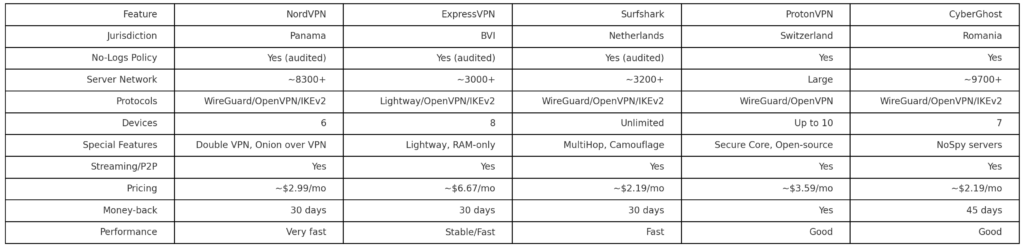
These VPN apps can be beneficial if you are looking for a simple security solution for yourself. Many small businesses do not have enough employees and resources to justify implementing an enterprise-level VPN solution. For example, if you run a side hustle in your spare time that involves lots of on-the-go communication with clients, it is probably a good idea to use a VPN while you work out of a Starbucks or Internet Cafe. In today's digital landscape, it should be a rule of thumb to never before business operations on a public untrusted network that you do not have control over. In cases such as this, buying a subscription to a reputable VPN provider is a great investment. Just make sure to compare and contrast vendors and select the one with the best reputation for user privacy and security. The chart attached below compares and contrasts some of the most popular VPN apps on the market today.