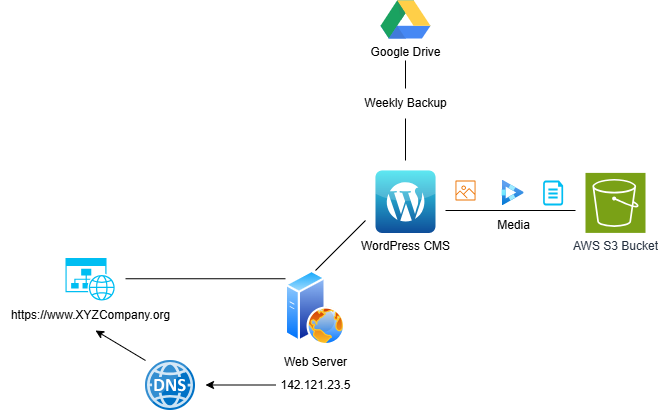
In recent years, social media has appeared to replace websites as the primary method of promoting businesses on the Internet. However, websites are still widely used, and creating one for your business is still recommended for reaching a wider audience and appearing professional. Organizations of medium to large size may self-host their websites through a server running on a DMZ network segment or in the cloud.
A small business owner usually has no particular benefit from self-hosting a website. Smaller organizations will usually use a third-party website builder like WordPress, Squarespace, or Wix. Those in the e-commerce industry may use Shopify, a website builder specifically for online vendors. All of these platforms are known as Content Management Systems (CMS).
Regardless of what platform you use to build your website, there are some security controls you should enable to protect the integrity of your website and its corresponding data. The majority of these settings can be enabled through the dashboard of your CMS.
- Create a webmaster role for the root control over your site. It is good practice to isolate the roles created to manage your site. You should make a default webmaster role that serves as the owner and root account over your website builder instance. Then, create a dedicated account under your name to use for all website construction. Therefore, if your account is compromised while on the Internet, an attacker will not have root access to the entire website. Aim for something like webmaster@mycompany.org. Example roles include: Subscriber, Contributor, Author, Editor, and Administrator.
- Properly manage permissions for website contributors. Allowing various employees in various departments to contribute to website content is a great way to streamline engagement. When creating accounts on a CMS like WordPress, ensure that all users only have the least privileges necessary to perform their role on the website.
- Keep third-party plugins updated. Access to third-party plugins is a feature present on some website-building programs. WordPress is known for its extensive library of extra plugins. However, these plugins are known for serving as an enticing target for attackers. Make sure to patch your plugins as soon as updates become available. Turn on automatic updates if available.
- Use Multifactor Authentication for all website accounts. Any contributor to your website should be required to enable multifactor authentication for their account. This makes it harder for attackers to brute-force logins to your website backend.
- Use anti-spam plugins. Many CMS platforms offer plugins to help mitigate spam comments on your webpages. It is best to enable one of these before your blog sections are overloaded with spam.
Beyond the CMS itself, security needs to be implemented within the actual structure of a company website.
HTTPS is a protocol that encrypts traffic between your customers and your website. If your website involves any e-commerce or transmission of PII, then using HTTPS is a REQUIREMENT. HTTPS is implemented by signing your website's server with an SSL certificate. Many premium CMS platforms sign your website for you. However, if you are using a CMS platform like WordPress installed on a self-hosted web server, you will need to have your server signed by a trusted third-party Certificate Authority. Let's Encrypt offers free SSL certificates for websites.
Backups are not optional when it comes to website content. Websites can be easily compromised, with the content you posted being destroyed. Different CMS platforms have differing methods for backups. Some platforms make backups themselves and store them internally, while others allow you to customize backup schedules and store them in an off-site location. Make sure to follow your Backup Policy and store a local copy and an off-site copy, preferably with one in the cloud.
Your CMS may provide the option to offload digital media from the CMS itself to a third-party cloud platform. This is a great way to improve the performance of your website and add a layer of security by removing the single point of failure. WordPress, in particular, works great offloading to AWS S3 storage buckets.