
Hardening is the process of reducing a system’s attack surface by patching vulnerabilities, disabling unnecessary services, and restricting functionality to only what is required for normal operations. Modern operating systems ship with a large number of services and features enabled by default in order to support a wide range of potential use cases. In most environments, however, users only rely on a small subset of this functionality.
Within a typical business environment, users generally need only a limited set of capabilities: access to the internet, authentication to business applications and services, and the use of a defined set of productivity or line-of-business software. Any additional services or capabilities present unnecessary risk. Administrators should therefore implement a baseline hardening checklist across all operating system instances to minimize the organization’s attack surface. The objective is to enforce the principle of least functionality, ensuring that systems provide only the capabilities required to perform legitimate business tasks.
Windows is the most widely deployed desktop operating system and includes extensive built-in tools that simplify the hardening process. One of the most important of these tools is Group Policy, a centralized management framework that exposes hundreds of configurable security and system settings. Through Group Policy, administrators can build granular security configurations and enforce them consistently across managed systems.
Group Policy is administered through Group Policy Management, a feature included with Windows Server. In domain environments, administrators configure policies through the Group Policy Management Console (GPMC). Once defined, these policies are linked to appropriate locations within the Active Directory hierarchy and automatically applied to domain-joined computers and user accounts. Administrators can control the scope of policy enforcement by linking policies at different levels. For example, a Default Domain Policy may apply to the entire domain, while additional policies can be created for specific groups of users or computers.

Group Policy is also available in non-domain environments through Local Group Policy. Windows Professional, Enterprise, and Education editions include the Local Group Policy Editor, which exposes the same configuration options available in domain policies. The key difference is scope: Local Group Policy applies only to the individual system on which it is configured.
When multiple policies exist, Windows processes them in a defined order of precedence:
- Local Group Policy
- Group Policy Objects (GPOs) linked to the Active Directory Site
- GPOs linked to the Active Directory Domain
- GPOs linked to Organizational Units (OUs)
In practice, policies closer to the target user or computer take precedence over those defined higher in the hierarchy.
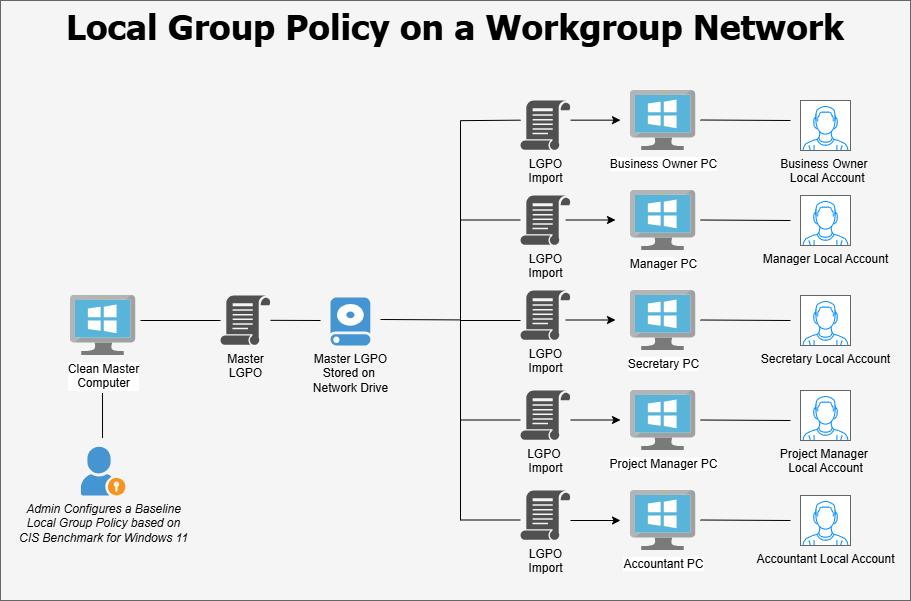
Organizations that do not operate an Active Directory domain must rely solely on Local Group Policy. While effective on individual machines, this approach does not scale well in environments with many systems. Administrators may be required to manually configure policies on each device, which is time-consuming and prone to inconsistency. To address this limitation, many administrators use scripts or policy templates that automatically apply a baseline configuration to Local Group Policy. One commonly used option is the Microsoft Security Compliance Toolkit, which provides pre-configured security baselines developed by Microsoft. Additionally, numerous community-created templates and automation scripts are available through platforms such as GitHub. Organizations should carefully validate any third-party tools before deploying them in production environments.
Group Policy can also be extended to manage the configuration of third-party applications. This is accomplished through Administrative Templates, which are distributed as pairs of .ADMX and .ADML files. To install a template, the .ADMX file is copied to the C:\Windows\PolicyDefinitions directory on the system hosting the Group Policy console, while the corresponding .ADML language file is placed in C:\Windows\PolicyDefinitions\en-US. Once installed, the Group Policy Editor will display additional configuration settings for the associated application. Administrative templates are commonly available for applications such as Google Chrome, Mozilla Firefox, Adobe Reader, Microsoft Edge, and Zoom.
When hardening Windows systems, administrators typically rely on established security benchmarks to guide their configuration decisions. Several respected cybersecurity organizations publish detailed hardening guides that outline recommended policy settings. The Center for Internet Security (CIS) provides comprehensive CIS Benchmarks covering Windows operating systems as well as many other platforms and applications. The U.S. Department of Defense publishes Security Technical Implementation Guides (STIGs), which provide similar configuration guidance tailored for defense and federal environments. Microsoft also distributes official Windows security baselines through the Microsoft Security Compliance Toolkit. In addition to these sources, numerous community-developed checklists are available online.
While these benchmarks provide valuable guidance, effective hardening requires tailoring security controls to the specific needs of the organization. Not all environments require the same level of restriction, and some recommended settings may interfere with operational requirements. Tailoring is the process of modifying a baseline security configuration to account for organizational needs. This may involve applying scoping guidance, defining compensating controls where recommended settings cannot be implemented, and specifying organization-defined parameters within security controls. Proper tailoring ensures that security baselines improve system security without unnecessarily disrupting business operations.
The responsibility for defining a system hardening strategy ultimately rests with senior management in coordination with IT and security personnel. Security baselines, templates, and automation tools should be carefully evaluated before deployment. To minimize the risk of disrupting production systems, proposed hardening configurations should first be tested on a small set of pilot systems isolated from the primary business network. This controlled testing environment allows administrators to observe the impact of security settings, identify compatibility issues, and refine the configuration as needed. Once a stable and validated baseline has been established, it can then be deployed across production systems within the organization.